Pete Dowson
-
Posts
38,265 -
Joined
-
Days Won
170
Content Type
Profiles
Forums
Events
Gallery
Downloads
Everything posted by Pete Dowson
-
Determining aircraft's ground track
Pete Dowson replied to SeanMcLeod's topic in FSUIPC Support Pete Dowson Modules
Well, that's what the names of those imply when you save a flight and look in the .FLT file, e.g. [simVars.0] ... PVelWorld=0.00016016837602437931 BVelWorld=5.2741978078219892e-005 HVelWorld=-3.1679513659914766e-007 XVelWorld=8.5849995967027069e-005 YVelWorld=-3.6722501463765101e-006 ZVelWorld=0.015182631094688877 Apart from that I've no idea what they are, sorry. I don't know. It depends what "world axes" means relative to "body axes". The only person I know of that understood all that stuff is Ian Donohoe, and it was his information that originally led to me adding this stuff to the FSUIPC list of values. All I've done since then is track them down on each successive FS version. Those that understand them use them, but I am sorry I am not one of those elite few. :? All I can suggest is try it and see. Try it on FS2004 so you can compare it with the GPS value I pointed you too. If it works, then apply it to FS2002 as well. Regards, Pete -
Limiting Icing Severity in FSUIPC
Pete Dowson replied to jase439's topic in FSUIPC Support Pete Dowson Modules
The only "pitot heat" indicator I know of is the switch itself, plus an electrical circuit flag ("PITOT_HEAT_CIRCUIT_ON"). You could check the latter. It is in the list of Gauge values which FSLook provides, and as far as I can see the circuit normally stays on whilst there's an active electrical system whether ot not the switch is operated. Possibly in extreme icing the circuit blows a fuse? There's also an FS control called TOGGLE PITOT BLOCKAGE which you could try using -- assign it in FSUIPC or in the FS Options-Controls-Assignments (where it's called "Pitot tube blockage on/off"). Regards, Pete -
Determining aircraft's ground track
Pete Dowson replied to SeanMcLeod's topic in FSUIPC Support Pete Dowson Modules
The ground track isn't normally provided. The programs that do show it calculate it from heading, TAS and ambient wind speed and direction. You can't derive it without taking the wind into account. However, if you are doing this only for FS2004 you can 'cheat' and get it from the GPS data in the 6000-61FF area. Check offset 6040. I think it is valid even with no plan loaded. Of course in a real airliner it's sort of the other way around. The track is provided by the INS and the wind indicator for the ND is derived from the differences that provides from heading and TAS. Regards, Pete -
Limiting Icing Severity in FSUIPC
Pete Dowson replied to jase439's topic in FSUIPC Support Pete Dowson Modules
And with anti-icing enabled or disabled? FSUIPC gets blamed for all the ills in the world. I get used to it, but it is depressing nonetheless. :( There's no icing in FSUIPC unless you elect to enable the random cloud icing. Again, this applies to third party weather inputs only, not to FS "real weather" downloads. I can certainly add a limit option, but you are under a misunderstanding, as the random icing cannot be applied to FS's downloaded localised weather. It can be applied to the global weather but that is only used by FS where there are no nearby WX stations, and even then an additional option in the Technical page has to be enabled in FSUIPC (with it on you cannot retain Themes). Well, it hasn't been brought up in the Microsoft Beta newsgrups either. Generally identified FS errors are mentioned there, else it is unlikely they'll be fixed in the next version either. And why don't the problems occur with FS downloaded weather? Don't the Jeppesen/Microsoft weather reports ever have icing in clouds? In any aircraft, or only some? If the aircraft is equipped with anti-icing, does this make any difference? Possibly it occurs on aircraft where the pitot tube is on the wing or in other places more liable to severe icing? Is the aircraft realism turned up to 100%? What if that is lowered? Are folks really actually complaining about some additional realism introduced into FS2004 which wasn't there before? Well, I've added the item to my list, and it is reasonably easy to do (for third party inputs, and the random icing option) so it'll probably get done in the next version. I'd like to know what icing level you need to set to force this failure -- is it only the top level, or anything other than 'slight' (1)? I'd also still like to know whether it is really an FS bug or not. Maybe MS just changed the icing scale in FS2004 compared with previous releases, and the values used in the Weather programs need scaling down for the same effects as before. Or maybe the new effects are more realistic. There's a difference. Regards, Pete -
Sounds like it might be checking the version number of either FSUIPC or FS, or possibly both. Maybe you need an update for FS2004 -- have you looked to see if there is one? Not all programs will work without changes. You could try adding "MakeItVersionFS2002=Yes" to the FSUIPC.INI [General] section, but if you do that many other add-ons may go wrong because FSUIPC will be lying about what version of FS it is. And I don't support the use of this "fiddle". Regards, Pete
-
About the weather of FS9
Pete Dowson replied to na5088's topic in FSUIPC Support Pete Dowson Modules
Unless you have applied the limits on visibility in the FSUIPC options, FSUIPC cannot interfere with FS2004's real weather. It sounds like there was a problem with the Jeppesen/Microsoft weather website. FSUIPC is not a fix for everything which may go wrong with FS. Regards, Pete -
Limiting Icing Severity in FSUIPC
Pete Dowson replied to jase439's topic in FSUIPC Support Pete Dowson Modules
This is news to me. Icing isn't a problem with pitot heat and, possibly also, the anti-icing enabled. At least I've not experienced any problems, and yours is the first report I've seen. FSUIPC could only reduce or eliminate icing when it is being set be external programs. It cannot do it for weather set by FS's own downloads, nor for weather set from the menus. Apart from that it would be easy enough, but wouldn't the correct place be in the weather programs? The whole point of providing the extensive weather interface for those programs was to allow them full control, and now you want some taken away. I don't know what program you use, but have you asked the author about this, as a possibility? Regards, Pete -
AP_SPD_VAR_SET in epicinfo.cfg
Pete Dowson replied to joeymars's topic in FSUIPC Support Pete Dowson Modules
Where and how? Sorry, the terms "raw" and "directx" don't really go together as far as I've found. Depends whether you count from 0 or 1. :) That's an error returned by EPICIO.DLL (part of the USB Epic package), but as it corrected itself immediately afterwards I wouldn't worry about it. Maybe it's an initialisation state. It logs the axes and the values. With Log=3 if changes were seen on your programmed axes at all they'd be logged. If there's nothing like that in the log then the changes aren't being seen. I noticed you have "AxisReads=Both", so it seems the changes aren't getting through either the Windows route or the EPICIO.DLL routine. I really think you'll need to check things with the EPIC folks, unless someone else here can jump in. It sounds like something related to the way you've defined things in the EPL, but I'm afraid I get puzzled by all that stuff too. I've not programmed EPIC seriously since the new EPL was invented. Regards, Pete -
AP_SPD_VAR_SET in epicinfo.cfg
Pete Dowson replied to joeymars's topic in FSUIPC Support Pete Dowson Modules
I don't know what you mean when you say you've "debugged the joystick values". Values "Px" are not virtual axes, in the sense I understand, but POVs ("Points Of View" controls). You don't say whether you are using FS98, FS2000, FS2002 or FS2004. You don't say whether you are using ISA EPIC or USB EPIC. I also need the EPICINFO version number, and the FSUIPC version number. But first, please help yourself by using the logging facilities in EPICINFO as documented. The log should show you what is going on. Regards, Pete -
Thanks! Your solution should do the trick, I think, although your objective isn't exactly the same thing. The centreline needs to be though the centre of the aircraft, but I am sitting to the left (being Captain) and I want to see straight ahead, to the point on the horizon which is otherwise on the join between two monitors. This does, of course, represent a minute angle towards that centerline. But with a real obstruction so close as the windshield it wouldn't matter. The trouble is you can't look around the join of the two monitors. Reading that back it looks a bit confused. Sorry. It does make a sort of sense I hope :) Pete
-
FSuipc mod for Fokker50 Espen Oijordsbakken ?
Pete Dowson replied to PhilippeV8's topic in FSUIPC Support Pete Dowson Modules
FSUIPC already gets all the useful data it knows about out of FS. What is it that FS knows and which you cannot get from FSUIPC as it is? If it is stuff buried in some cockpit gauges surely it is up to the programmer of those gauges to provide your access? He can use FSUIPC if he wishes, maybe optionally. No, that is not the way to do it. Espen can ask me for an allocation in FSUIPC's memory, and he can then interface to FSUIPC and use those locations. You can then read and write them through the normal IPC interface to FSUIPC. This is thay is should be done and has been done for several implementations already. Everything I have received for the SDK is in the current version except for a recent correction to the code the C#.Net and VB.Net, which will be published soon enough. I have no other reports of problems with code in the SDK. Regards, Pete -
How do you "shift" the view over without changing the angle of view? You still need to be looking in the same direction as the nose. Regards, Pete
-
Yes, even worse is 2D stretched over 3 screens on a Parhelia. If you wanted to use a 2D panel you'd need to reconfigure the sizes of the bitmaps and the gauge proportions and positions. The only thing I don't like about 2 screen views is that straight ahead is right where the join of screens is. I suppose there's a way to move scenery view to left or right without changing the angle of view, but I didn't find it. Regards, Pete
-
Those two statements seem to directly conflict with each other. Can you explain what is happening, please, rather than attempting a diagnosis initially, as I really cannot understand how it can be sending the weather and not sending the weather at the same time. Observations with both WeatherSet and the FS Weather Dialogues would be useful. Neither. Before FS2004 I and many others have been using FSMeteo on FS2002, and FS2000 before it (the Weather implementation didn't change between those two) for nearly 4 years without such problems. Let me know what the problem actually is first. Things like Veriosn numbers are also useful -- in fact essential, please. Regards, Pete
-
WideFS, Wideview and keysend
Pete Dowson replied to F-111's topic in FSUIPC Support Pete Dowson Modules
Yes. Since WideClient "pretends" to be FS, you can't run it whith a real FS present -- client programs would not be able to tell which to attach to in any case. Sorry, no, unless you have another EPIC on the second PC and get the two talking. I know that's something R&R planned for the USB version but I don't know how far it's got yet. With the ISA version, under Win95/98, I provided EpicLink for this. Otherwise it sounds like a good facility for WidevieW to provide. Have you suggested it to Luciano? Regards, Pete -
It's difficult enough for me to keep up with Enrico's changed in FSUIPC, let alone the code in EPICINFO which is in fact far older (dating back years). Enrico says he's going to revise quite a lot of this stuff soon, hopefuly keeping backward compatibility, and after that maybe I'll look at trying to catch up again, though it wouldn't be my top priority -- FSUIPC would. Meanwhile the button programming in FSUIPC is actually easier to use, as (a) it is on-line in FS, and (b) it recognises the buttons without you having to work out any numbers and so on. When I added all that to FSUIPC I didn't actually remove the older facilities in EPICINFO since that would incapacitate existing set-ups, but I had hoped not to have to go back and continue modifying the latter. Regards, Pete
-
USB PFC JetLiner Yoke and pfc.dll
Pete Dowson replied to Rafael Castañeda's topic in FSUIPC Support Pete Dowson Modules
Sounds like you need to re-wire the yoke altogether to suit the throttle quadrant. I cannot advise you how to do that -- you probably should have told PFC you wanted to connect it that way when you ordered it. Check with them anyway, perhaps they'll exchange it for you instead. Regards, Pete -
Specifically on the PMDG737? You are saying you have spoilers on other aircraft working fine, but not on that particular one? If so you need to contact PMDG support to see what they've done. I thought that they operate the spoilers in the standard manner, using the normal FS controls. If you don't mean specifically that aircraft, but FS in general, you need to go into FS's Options-Controls-Assignments, select the Joystick, scroll down to find the spoilers axis, and do the assignment there. The fact that you use FSUIPC and WideFS isn't really relevant. You do not need either to get FS2004 spoilers working on an axis. This is supported by FS out of the box. By the way, don't try calibrating and testing the spoilers on the ground. The control only works correctly in the air. They'll flicker or move to 100% deployed (i.e. ground detente) if you try to use them on the ground. Regards, Pete
-
Where are you reading those? That's the maximum possible range allowed for the input. Yes, that would be the default position for the centre. You need to press the "Set" button in FSUIPC (so it changes to "Reset"), THEN use each of the separate buttons in turn to set the values which FSUIPC will use. Currently it sounds like you aren't using FSUIPC. Please check the FSUIPC User Guide. There are step-by-step instructions there. Regards, Pete
-
Great. Glad you resolved it so easily! No. Those numbers are simply the internal values for controls otherwise assigned in FS's CFG file. If you go to FS's Options-Settings-Assignments you'll see lots of controls you can assign to keystrokes or buttons. Each of those has a name and a number. FSUIPC lists the names in the drop-downs in its Keys and Buttons pages (it gets the names from FS's own CONTROLS.DLL). The numbers are simply how those names are represented internally -- and how FSUIPC records assignments in its INI files. 66532 for instance is the control named "AIRSPEED BUG SELECT" (whatever that is). If you want to assign keystrokes to controls you can do that in FS's Assignments or in FSUIPC. The only difference is that FSUIPC lists all of them, whether useful, working, or not. It simply extracts the list from CONTROLS.DLL. FS only lists those that Microsoft thought you'd find useful. I think GoFlight have their own programming system for assigning controls to their buttons and switches, though, again, they seem to be rather selective. Happy New Year, Pete
-
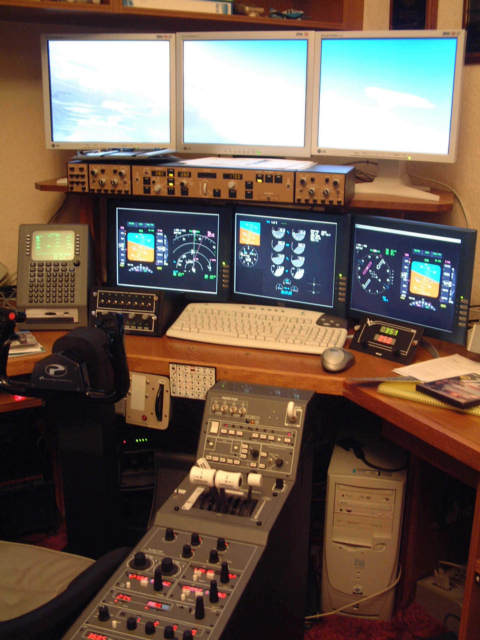
Well, it was -- till I visited some real home-made cockpits in California earlier this year. Now this one feels like what it looks like, a bunch of computer bits on a desk. I'm saving up now for a PFC Jet Cockpit (http://www.flypfc.com). I need one 'ready-made' as my only 'practical' skill is programming. Ahanother "real" cockpit builder! At least when you've finished it will feel like a cockpit, not a collection of computer bits! :) Happy New Year! Pete
-
HELP WITH fs2002 2004 NO JOYSTICK
Pete Dowson replied to Ron Buchwald's topic in FSUIPC Support Pete Dowson Modules
These are both very old. The last completely free versions (not suitable for FS2004) were 2.975 and 5.5 respectively. Since you can't use those versions on FS2004 at all (they won't even run!), if you are getting similar problems on FS2002 and FS2004 they are evidently nothing to do with my modules, but let's see ... Your "analogues" are joysticks and throttles? Calibrate them in Windows and assign them correctly in the Options-Settings-Assignments section of FS. This is the same sort of process as it was in FS2000. But you may want to add "stick_sensitivity_mode=0" to the [Controls] section of the FS CFG file. This makes FS2002 and FS2004 treat the analogue inputs more like they were in FS2000. I don't know how that works -- FS2000 always listed the joystick assignments, nice and cleanly with proper Joystick identifications. Since FS2002 FS has used Direct Input (part of DirectX) for joysticks, and this, in my opinion, messed things up somewhat. The Joysticks are then identified by complex "GUID" strings of numbers and letters. No, but FSUIPC and WideFS are absolutely nothing to do with this -- you need to get FS to recognise your joysticks with no add-ons or add-ins anyway. Why do you think my modules are involved? I do note you listed "FS Comm" and "Epic USB Epicenter" amongst your add-ons. Is FS Comm an EPIC driver for FS, and does it use FSUIPC or does it do things differently? It isn't one of my programs -- in fact I note that you don't use any of my EPIC related programs anyway. Perhaps your problems are related to EPIC? Do you have any analogues connected through that, and are they being mapped to normal joystick controls or processed by your own programming in EPL? If the former then you still need the Windows calibrations and FS assignments correctly sorted. If the latter then it sounds like a question for FS Comm. Certainly, if FS comm uses FSUIPC then for FS2004 you'd need FSUIPC 3, not 2. If it doesn't, then perhaps you need an FS2002 version for FS2002 and an FS2004 version for FS2004. Certainly that isn't true for EPICINFO, which is primarily an OUTPUT module -- it only provided some POV/Soft axis inputs AFTER FS2002 came out, precisely because proper radio control was impossible using POVs through Direct Input -- POVs were used in FS2000 quite happily, as any value could be used. Direct Input destroyed that, only "proper" POV values were accepted. That's why I added such things to EPICINFO. It has NEVER had any axis type input facilities, they are always between EPIC and Windows to sort out. I have no idea what "FS COMM" does. Sorry. Regards, Pete -
No, I run full-screen as one display. The resolution I currently use is 2400 x 600 but it will go up to whatever you like. My displays will allow 3840 x 1024. But since I have no panel display on it, the difference for an outside scenery view isn't so noticeable so I reduce the resolution and enjoy a better frame rate. The display is running a 0.50x Zoom, which suits me. some Parhelia users prefer 0.31x but I find that rather unrealistically wide. I prefer the view to be a genuine looking wide front view, not a wraparound cockpit, but you could use it at 0.31x which wuold give what you suggest. The Parhelia certainly is not a fast card compared with the current crop of ATI and nVidia cards, so even driving one screen it isn't a screamer. But at present it's the only card which does what I want. I actually use two of them -- one is in a second PC runs my Project Magenta instrumentations -- Captain's ND/PFD, EICAS, First Officer PFD/ND on the three screens. I have everything in FS turned up to max, plus Ultimate Traffic running at 100% and with detailed airports like UK2000 Manchester. My FS Frame Rate Limiter is set at 20 fps, and most of the time the Frame Rate is hitting 19.9 -- never dropping below 10. That's fine for me. If it ever dropped below 10 I'd reduce some of the settings. This is on a 3.2GHz P4, mind. I don't run any instruments on the FS PC. I'm not sure what sort of performance you'd get then. I suspect you'd need to reduce a few settings. And since you'd need to run at a higher resolution (for the sake of the instruments) it doesn't sound so attractive. I would really only recommend it for the widescreen "wraparound" views, not for supporting three independent screens. To do what you now suggest I would rather recommend a fast ATI or nVidia AGP card for the two views and a possibly slower PCI card for the instruments. Regards, Pete
-
Strange fsuipc on 2002 and 2004
Pete Dowson replied to marcofa's topic in FSUIPC Support Pete Dowson Modules
Yes, for some of the facilities -- the same things are not provided on both. Please see the examples and descriptions in the user guide. By the way, the current version is 3.135. Regards, Pete