Pete Dowson
-
Posts
38,265 -
Joined
-
Days Won
170
Content Type
Profiles
Forums
Events
Gallery
Downloads
Everything posted by Pete Dowson
-
wide fs and IOCARDS and SIOC
Pete Dowson replied to mvc321's topic in FSUIPC Support Pete Dowson Modules
Phew! What on Earth is it doing with all that processor time? That's crazy! This is not something I'm familiar with I'm afraid. I don't know even if this "sioc" uses the FSUIPC interface. If it doesn't then it won't run on WideFS. But if it does, then, yes, it using most of the other processor won't drag WideServer down on the FS PC. However, it might not work so well if it doesn't allow WideClient to get much processing time, to handle the networked connection. Have you asked on whatever support forum the "sioc" folks inhabit? For WideFS? On FSX you need the WideClient program from the WideFS package. For FS9 and before you need the whole WideFS package. It includes documentation. It doesn't work till registered in either case, and registration is separate for WideFS7 (on FSX) and WideFS6 (on FS9 and before). Regards Pete -
Yes, of course, and it has been done. Where have you been these last 18 months? ;-) As far as the IPC facilities are concerned, that is exactly what SimConnect is. I was involved in SimConnect right from the start. It doesn't (yet) quite do everything that FSUIPC does, but it also, in some areas, does a lot more. Yes, he did, he's been working in the FS team since FS2000 days, but he's left now. He was not involved in SimConnect. His area of specialisation was graphics. Well, no, it was the other way around, ensuring that SimConnect was up to the job. The only reason it falls short in some areas is, well, time and money. As usual. Take a look some time at the FSX SDK. The SimConnect interface is quite well documented, and is being used more and more. ASX, TrackIR, the new PMDG aircraft, and so on, all directly interface to SimConnect, not FSUIPC. The FSUIPC4 application interface for FSX exists only for backward compatibility, to tide things over until all programs interface direct to SimConnect. This is why my development efforts in the last year have been almost entirely centred on extending the User facilities in FSUIPC, to make it worthwhile as a "Swiss Army Knife" type of toolkit for users. The demand for it to be used as an application interface is receding as SimConnect takes over. Regards Pete
-
Can't buy FSUIPC & WideFS
Pete Dowson replied to flying_pilot's topic in FSUIPC Support Pete Dowson Modules
I really have nothing to do with the SimMarket system. I know they don't accept "debit" cards, but credit cards should be fine. Have you raised a problem ticket with them? All I can do is forward your complaint to the Manager, in case there's a glitch in their system. [LATER] I forwarded the message and the Manager says he will take care of it via the problem ticket system, so please make sure you go through that procedure. Regards Pete -
Yes, it was true at the time, but not now. I will re-word it. Thanks. Could you please tell me what action fixed it for you? Regards Pete
-
There's the reason! There's more information and possible fixes described in the User Guide. Please refer to the boxed section under Installation entitled "IMPORTANT: Before updating from 3.71 or earlier to 3.72 or later". (Yes, I know it may not apply to you with that wording -- I'll have to revise that). If none of the remedies work, the only other thing I can think of it to try the Help suggested for signature problems in FSUIPC4 -- see the Announcement above entitled "Help with FSUIPC4 code signature problem". Please let me know how you get on. So far, for Vista, there have been just a few codesigning signature problems, but I need to know what is going on. It looks like something in Vista options can get screwed up. Regards Pete
-
Running both FS2004 and FSX
Pete Dowson replied to blaster454's topic in FSUIPC Support Pete Dowson Modules
Yes, of ocurse, assuming you want to use the facilities of FSUIPC and WideFS with both. Yes. Unfortunately you purchased them the wrong way around -- there's a good discount when upgrading to the FSX versions, but not the other way. You only need to back up your FSUIPC.KEY and FSUIPC4.KEY files. You don't need to key them in like a password everytime you want to run FS! Regards Pete -
As explained in the User Guide, only the user functions aren't available to an unregistered user. So that program has a problem. Maybe the answer is in the FSUIPC Log file. Please try again, then close FS down and show me the FSUIPC.LOG. It is an ordinary text file in the FS Modules folder, so you can paste it here. Regards Pete
-
FSUIPC for Microsoft ESP
Pete Dowson replied to lwha6500's topic in FSUIPC Support Pete Dowson Modules
Do you have ESP? Isn't ESP aimed at Corporate customers with integrated solutions supplied by Microsoft Partners, or something similar? I probably have the actual terms wrong, but I don't think a generally available add-in like FSUIPC is directly applicable except as part of such a solution. If you are involved in developing ESP solutions in this way, perhaps you should write to me at petedowson@btconnect.com. Regards Pete -
Sounds like you have Explorer set to hide system files. There are three options I always make sure I have set the way which shows me what files REALLY are there. Go to Windows Explorer -- Tools - Folder Options - View: "display the contents of system folders" -- enable "show hidden files and folders" -- enable "hide extensions for known file types" -- disable Regards Pete
-
It's actually a user problem. ;-) Please read the instructions in the User Guide, and especially note the part (in emboldened red!) about needing to run FSX "As Administrator" when needing to Register. Regards Pete
-
The last line at least, maybe more. The last line reads something like ***** FSUIPC Log file closed ***** and is a useful indication that all the assorted threads terminated okay and the memory allocations properly freed. If that indeed was the complete log, then it looks as if FSX is not terminating correctly but hanging at the end. Regards Pete
-
Sorry, no. Pete
-
In FSX, unlike in FS9 and before, when the ATC Menu is showing it seems to trap the keyboard input itself, and passes very few on at all. This actually seriously clobbers keyboard fliers using ATC, because when the ATC Menu is showing they cannot use the NumPad keys for the aileron, elevator, throttle and trim operations! The problem has been reported to Microsoft but i don't expect it to be changed now before FSX1. Perhaps you should try using the FS ATC controls instead? I've not tried them, but they shouldn't become trapped like key presses would be. See ATC MENU 0 to 9 controls. BTW a full list of FSX controls is installed in your FSX Modules folder by FSUIPC4's installer. In general you are ALWAYS better off assigning the controls directly. Key presses are mainly of use for 3rd party programs. When you send FS a key press it looks it up in its assignments and converts it to the FS Control, so it is always more efficient to assign the control in the first place. ;-) Regards Pete
-
You still didn't delete the assorted FSX parts set in "Documents and Settings\Application Data", though. I can see that from this in the Log: Now checking DLL.XML ... ... There is a previous DLL.XML, checking for FSUIPC4 section. I can also see the full folder names for the FSX folders you should have removed for a full un-install: C:\Documents and Settings\James\Application Data\Microsoft\FSX\ and C:\Documents and Settings\All Users\Application Data\Microsoft\FSX\ Okay. Yes, if that includes a disk reformat it would certainly get rid of any FSX leftovers! Regards Pete
-
Thanks for this. I've taken the liberty of putting this suggestion more permanently into the Forum as an Announcement. Best regards Pete
-
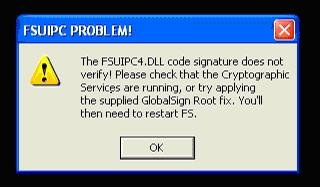
Some folks, especially those with non-English versions of Windows (XP or Vista), are getting this problem with FSX + FSUIPC4: Thanks to a blog by Lefteris Kalamaras begin_of_the_skype_highlighting end_of_the_skype_highlighting begin_of_the_skype_highlighting end_of_the_skype_highlighting begin_of_the_skype_highlighting end_of_the_skype_highlighting ( http://lkalamaras.blogspot.com/2007/06/-good.html ), pointed out by "jammi" in our Forum, this should be quite easily rectified, though it does require Registry editing, so take care. Run REGEDIT (you'll probably have to run it "as administrator" on Vista) and search for the following path: HKEY_CURRENT_USER\Software\Microsoft\Windows\CurrentVersion\WinTrust\Trust Providers\Software Publishing Then change the value from 0x63c00 (or whatever it has become) to 0x23c00, which I believe is its default (working) value. If none of the above helps, another cause of similar problems has been identified, also in the Registry. Try deleting the following registry key: HKEY_LOCAL_MACHINE\Software\Policies\Microsoft\SystemCertificates\TrustedPublisher\Safer Regards, Pete Dowson
-
Oh, good. So, FSUIPC should see it (or them, rather) when you change from one mode to another. It should see one "mode" being released and the next pressed. It is the transition from released state to pressed state which is detected in the options dialogue. Regards Pete
-
FSX... no "modules" menu
Pete Dowson replied to jeffeven's topic in FSUIPC Support Pete Dowson Modules
AdvDisplay was discontinued some time ago. It most certainly doesn't work in FSX. The function of AdvDisplay was replaced by facilities in FSUIPC some 2-3 years ago, for FS2004 and FSX. AdvDisplay is only useful now on FS2002 and before. FSX never has a Modules menu. It will have an Add Ons menu if you install FSUIPC4 or other add-ins. Try the Announcements at the top of the forum. That is where all the information is placed, for reference. Posts are ephemeral and so not a good reference point. Look especially at the "List of Supported Versions" where you will find this: AdvDisplay 2.14 (4th November 2005) -- FS2004 compatible No longer being developed even for new versions of FS. The programs which are compatible with FSX are labelled so. Regards Pete -
Okay, I have finished streamlining the wind smoothing changes and I think there's no easily measurable performance impact. Version 4.216 is available in the FSX Downloads Announcement, now. Regards Pete
-
You omitted the final line or two in the FSUIPC4.LOG. I really always need to see the whole log. However, I have a couple of observations: First you are still using the original rather buggy version of FSX. So many bugs were fixed by the free SP1 update that I really advise you to install that. It may well be that the IFLY aircraft depends on it in any case. Second, your SimConnect is not working well. Here are the symptoms: Evidently no data is actually arriving from FSX via SimConnect and FSUIPC is retrying every three seconds. I'm not sure what is causing this, but the most likely culprit is an incompatible security program -- either your anti-virus or firewall program or their settings. If you update to FSX SP2 level then these programs will no longer present any problems for local use of Simconnect. You'd need to install SP1 first, then SP2. Both are free. altrernatively you could purchase the FSX Acceleration Pack which will get you to SP2 level in one go. To delve into the technicalities of the problems more please see the FSX Help announcement above. You would need to obtain a SimConnect log file, in the way it describes there. Regards Pete
-
Hmm. That in itself is very odd. After you uninstall SP2 it should still show SP1 and FSX itself. It sounds like something went wrong some time ago. There's a lot more for FSX in Documents and Settings -- one for each User for whom you have run or installed FSX, and one again in "All users" which keeps the scenery configurations and so on. These will be in Documentand Settings\User Name\Application Data\FSX. All of FSX's configuration data and so on is in these folders -- the stuff in the My Documents folder is pretty irrelevant, mostly. No, nothing. I really have no idea how FSX installations get into a mess, but it all seems to start happening when folks uninstall and reinstall. I have done this on a couple of PCs and never had a problem, so it is difficult for me to envisage why it should go wrong, but when it does you really do need to be thorough it seems. Leaving all of its configuration data still intact as it sounds like you have done isn't a good idea. Have a look in the main FSX forum here in SimFlight. I'm sure someone there posted a link to a complete uninstall script made available by Microsoft themselves. If not there, I've seen it someplace I'm sure. If I come across it again I'll add it to the FSX Help announcement. Regards Pete
-
Not so much a lecture, more a reminder, which seemed to be needed. The answers to your questions are there, after all. ;-) Pete
-
Ah, I thought all that was answered by the subsequent additions to the thread. I must admit to thinking it was all one, but I see now that there are at least two threads in one here. Looking at your INI settings, you seem to have a default set of Axis assignments in FSUIPC4 consisting of 0=0V,256,F,66292,0,0,0 1=3Y,256,F,66534,0,0,0 2=3Z,256,F,66382,0,0,0 which is a rather odd selection. You have an Axis Mixture Set on 0V, an Axis Flaps Set on 3Y and an Axis Spoiler Set on 3Z. No aileron, no elevator, no throttles? I assume you aren't using any aircraft other than the "Boeing 747-400 Paint5"? Because that's the only one with enough axis assignments. Before looking at those, may I ask why you are assigning in FSUIPC? Usually it is easier to do so in FS itself. It is a little more efficient in FSUIPC, but it does mean you have to make sure there are no similar assignments in FS -- have you done that? Try disabling the joystick altogether in FSX. (I can't tell what you've done in FS from here). Your "Boeing 747-400 Paint5" axis assignments in FSUIPC4 are: 0=0Z,256,F,66420,66423,0,0 Axis throttle1 Set and Axis Throttle2 Set 1=0U,256,F,66426,66429,0,0 Axis Throttle3 Set and Axis Throttle4 Set 2=0V,256,F,66422,66425,0,0 Axis Mxture1 Set and Axis Mixture2 Set 3=1Y,256,F,66292,66431,0,0 Axis Mixture Set and Axis Mixture4 Set 4=3X,256,F,66428,66431,0,0 Axis Mixture3 Set and Axis Mixture4 Set 5=3Y,256,F,66534,0,0,0 Axis Flaps Set 6=3Z,256,F,66382,0,0,0 Axis Spoiler Set Now this is a mess. To start with, why assign multiple throttles and mixtures to the axes when you can get FSUIPC to Map them in the calibration dialogues. It is no wonder you are in a mess. The calibration is receiving Throttle 1 and 2 signals every time you move that axis, and you are mapping Throttle 2 to 3 and 4! Don't you see how illogical that it? And the Mixture assignments are a mess in any case. Your mixture1 lever is assigned both to "all levers" and Mixture 4, and your mixture 2 lever to 3 and 4 also. Weird! You should really LOOK at the screen when assigning things, make sure you assign what you want. I suggest you DELETE all the [Axes..] sections for you INI file, and go assign your levers as normal in FSX. You are don't want to mess with more advanced things which you don't understand. Assign yout Throttle 1 lever to Throttle 1, your Throttle 2 lever to Throttle 2, and the same for mixture and so on. Use the standard FSX assignments. Check that they all work on a 2-engined aircraft. Then and only then go into FSUIPC4's Joystick calibration, go to the page with 4 throttles, calibrate both Throttle 1 and Throttle 2, separately, and check the "Map 1->12, 2->34" option in the lower right. You can do the same for Mixture and Prop Pitch if you like. That's it. On a two engined plane you have Throttle 1 and Throttle 2 operating their respective engines, and on a 4-engined place you have engines 1 and 2 on throttle 1 and engines 3 and 4 on Throttle 2. Surely this is MUCH simpler that whatever weird scheme you've been trying to accomplish? BTW looking at the Calibration section of your INI file: Mixture1=0,8192,8192,16380 Mixture2=0,8192,8192,16380 Spoilers=-16380,16380 Flaps=0,16380 Reverser=-16380,16380 Throttle1=-16380,-512,512,16380 Throttle2=-16380,-512,512,16380 Throttle3=-16380,-512,512,16380 Mixture3=0,8192,8192,16380 Mixture4=0,8192,8192,16380 Throttle4=-16380,-512,512,16380 These are ALL defalut values! They cannot possible all be correct for your joystick. I've never seen a joystick which gives exact values as assumed by default. You evidently have not even attempted to calibrate any of your axes at all! :-( Please make sure you not only assign things properly, more carefully especially, but also always go through the calibration steps. They are outlined very clearly. you cannot possibly misunderstand any of the simple steps! Get it working before even thinking about anything else. If you then seriously want to use FSUIPC4 assignments instead of FSX it would be best to disable the joystick altogether in FSAX and assign everything in FSUIPC4. But use one control per axis - the facility for multiple controls on each axis is not what you need. Also you can use the "Direct to FSUIPC calibration" instead of the FS controls, which will be more efficient. You may have to re-calibrate if you do that. Regards Pete
-
Seems that the Mode switch is either a button numbered outside of the standard 1-32 range (DirectInput, not used by FSUIPC, allows up to 64), or, more likely, it is not configured as a button at all and is dealt with through a private protocol for the Saitek driver. Not likely I'm afraid. Doesn't it have some sort of display on it too? Many modern USB devices are not just standard joystick "HID" (Human Interface) devices, and so are not dealt with via standard Windows libraries. Such devices have proprietary protocols with drivers for those aspects supplied by their manufacturer. The only way for your request to be met, I think, would be to ask Saitek to have a mode in their software which made the Mode switch transparent, as a normal button in the range 1-32. Regards Pete
-
Ugh! That takes me to some website called "ImageShack", registering me for some prize draw. Yes, it does enlarge the pix enough to read, but it is an awful way to communicate, and I had to do it several times just to answer the one simple question you could have kindly just said "yes" or "no" to -- that concerning wind smoothing! :( Please do not post pictures instead of answering questions again. I will not deal with support in such a way! :twisted: I see you did not have wind smoothing enabled, so I ask you -- why did you download 4.215 (as your first increment since 4.20) when the only change in that increment was the new wind smoothing method, offered as a trial to make sure it works? Anyway, enough said. I am experimenting with some improvements and hope to release 4.216 later today or maybe tomorrow. Try that if you like, but I am still primarily looking for feedback on the main changes. Regards pete