Thomas Richter
-
Posts
1,506 -
Joined
-
Last visited
-
Days Won
26
Content Type
Profiles
Forums
Events
Gallery
Downloads
Everything posted by Thomas Richter
-
Hi Pete sorry, but I had also to switch back, but in my case 3.712 is OK. FSUIPC 3.714 is doing crasy things, it "plays" with the Offsets. It sets and resets Offsets by its own willing. The FSUIPC.log shows ********* FSUIPC, Version 3.714 by Pete Dowson ********* Verifying Certificate for "D:\Flight Simulator 9\MODULES\FSUIPC.dll" now ... FAILURE! "WinVerifyTrustEx" error 0x80092003: This return is non-standard, possibly specific to trust provider Running inside FS2004 (FS9.1 CONTROLS.DLL, FS9.1 WEATHER.DLL) User Name="Thomas Richter"
-
No "Register application" button
Thomas Richter replied to MisterPlow's topic in FSUIPC Support Pete Dowson Modules
Hi Try this . http://forums.simflight.com/viewtopic.php?t=10812 -
Registration keys not received
Thomas Richter replied to jjstruyf's topic in FSUIPC Support Pete Dowson Modules
Hi Pete The email you get contains NOT the Keys But a LINK to the Keys: ----- When your current Status shows as -Delivered- it means: - Direct Download Items: you can now download your purchases and/or retrieve your registration keys from your account at https://secure.simmarket.com/xxxxxxx ------ You have to follow the link for your Keys. It works OK. -
Hi Did you try to install Simconnect manualy from DVD1 SDK folder? I did it some installations before and FSUIPC didn't work. After manualy install of Simconnect.msi (I think it called) it worked then.
-
FSUIPC4 Installer for FSX Problem
Thomas Richter replied to CNicholson's topic in FSUIPC Support Pete Dowson Modules
Hi Chuck delete the Modules folder in FSX and install 4.03 again. -
FSUIPC 4.03 and GFDevFSX problem
Thomas Richter replied to cyberavia's topic in FSUIPC Support Pete Dowson Modules
Hi Pete I also use FSUIPC4 4.03 together with GoFlight modules and the new Driver 1.70. I don't have any problems. I never get a Warning window, Security Warning dialogue or Error. Also not at the first start after installing the driver 1.70. The way to run I use is 1/ Start FSX 2/ If FSX is running I start the GoFlight driver. -
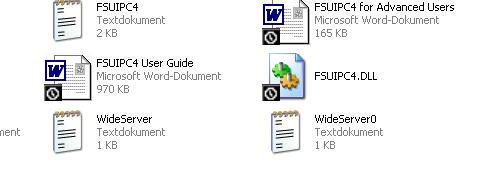
Hi Pete I had the same today (never before). 1/ I installed FSX (RTM from Disc) new. Testet, all was running. 2/ Run FSUIPC installer (4.026). The Installer said all OK. 3/ Modules folder created, BUT no files. 4/ Run Installer again, Error message: FSUIPC4.dll is only readable .... 5/ I had a copie of Modules folder from previous installation and copied th files in the new "EMPTY" Modules folder. But Windows is telling me ALL files are there ?? You see nothing in this Folder. So I overwrite the"EXISTING" files and all is working. BUT the overwritten files are now highlighted with the "black clock" or something like that. See the picture.
-
Hi Ben Did you all the settings described in PM-Manual ? Like: Here is a list of tips to make sure your network runs as fast as possible... this mostly applies to XP systems because they seem to be the most popular ones: - avoid any "Auto" settings in the network "LAN Settings" for the Link Speed / Duplex, e.g. use "100 Full Duplex" rather than "Auto" - Set the "receive Buffer" of your network card as high as possible - Disable the "Allow Indexing Service to index this disk..." in your "Local Disk Properties", as it really slows down network file transfer - Limit your FS frame rate, avoid "unlimited" 30 FPS should be enough for most, use 50 fps if you must and your hardware can handle it. High or Unlimited settings will leave WideServer very little time to process network traffic and will result in pauses in the connected programs. - turn off automatic updates - assign an IP address for every machine, do not use automatic settings for that - disable network authentication IEEE 802 - if you have control, turn off system restore disable automatic syncronize internet time Best Regards Thomas Richter
-
Hi Joao You did it ?? It doesn't work in the same way like FS9. I didnt't get it to work.
-
FSUIPC 4.0 : write to offsets 3101 and 3103
Thomas Richter replied to waldow's topic in FSUIPC Support Pete Dowson Modules
Hi Uli In FsX 3102 and 3103 don't work usefull, insead of them use: 281C, 4 Byte, MasterBattery 2E80, 4 Byte, MasterAvionics 1=ON and 0=OFF They work very well in FsX. -
Set Offset with Axis
Thomas Richter replied to Thomas Richter's topic in FSUIPC Support Pete Dowson Modules
Hi Pete Works now perfect, thanks a lot. -
Cannot register Widefs
Thomas Richter replied to wallers's topic in FSUIPC Support Pete Dowson Modules
Hi Wolfgang Just use your old e-mail address for register, because the address is part of the hole registration key. The address is not important because FSUIPC doesn't read your real address. -
Set Offset with Axis
Thomas Richter replied to Thomas Richter's topic in FSUIPC Support Pete Dowson Modules
Hi Pete No problem, thanks. -
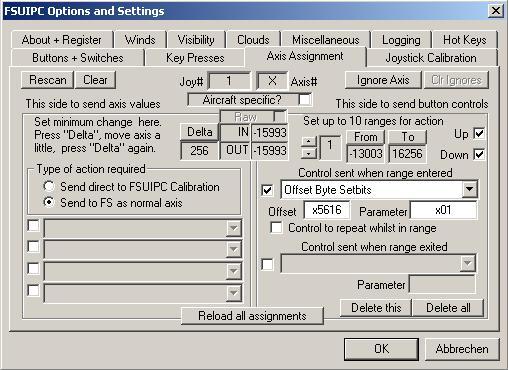
Hi Pete I'm trying to set a Offset Bit with Axis input. But no luck, the Offset I use 5616 is every time setting back to 0000. So it is not possible, but why ? See the picture what I did. After "OK" when I open again the Offset is #0000.
-
Hi Gilles 564D .1 means Offset 564D Bit 1, Bits are from 0 to 7 5610 1 means Offset 5610 1 Byte length If you want to set 564D Bit 1 (564D .1) in FSUIPC with a Key use in "Key Presses" i.e. "Offset Byte Setbits" or "Offset Byte Clrbits" to set or reset a Bit. For Offset 5610 1Byte length you would need "Offset Byte Set" to set a value.
-
Engine Start Lever
Thomas Richter replied to Norbert Woeller's topic in FSUIPC Support Pete Dowson Modules
Hi Norbert If you mean "Idle / Cutoff" you have to use the Mixture-Axis, that are the Fuelvalves. -
Problem with FSUIPC v3.60
Thomas Richter replied to vh-ufo's topic in FSUIPC Support Pete Dowson Modules
Hi, do you use latest FSUIPC (interim 3.619)? FSUIPC-3619.zip -
Goflight and Wilco 737 Pilot in Command
Thomas Richter replied to KingCat's topic in FSUIPC Support Pete Dowson Modules
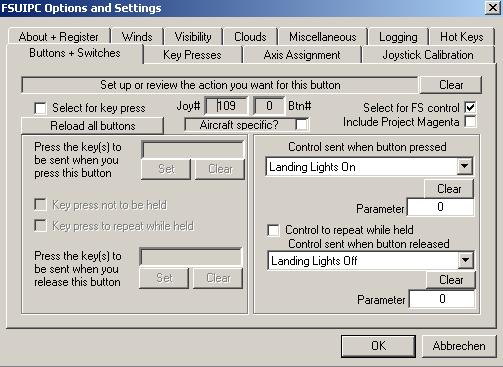
Hi, when I assigned on the first T8 the first switch, I can see in the FSUIPC-config in FS9 Modules-Folder: [buttons] 1=P109,0,C66059,0 2=U109,0,C66060,0 Do you have a entry like this vor your assigned switch in FSUIPC-config ? -
Goflight and Wilco 737 Pilot in Command
Thomas Richter replied to KingCat's topic in FSUIPC Support Pete Dowson Modules
Hi, Here is a picture for the way.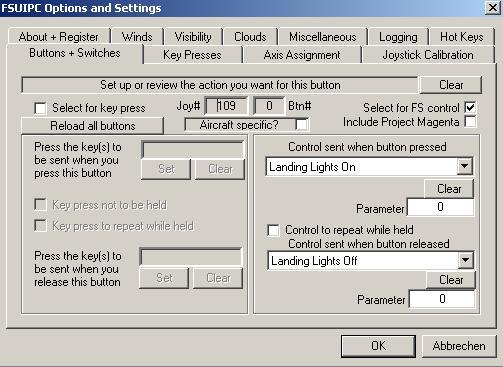
-
Goflight and Wilco 737 Pilot in Command
Thomas Richter replied to KingCat's topic in FSUIPC Support Pete Dowson Modules
Hi, did you delete the same functions in FS, the most have keys on your keyboard and FSUIPC is doing nothing in this case. -
Hi Thomas, take a look to this: http://forums.simflight.com/viewtopic.php?t=52883
-
Hi Robert, this is the wrong place like Pete told. You have to write the special Offsets that FSConv is using to connect over FSUIPC to Level D in your Phidgets Variable-file. FSConv is the Bridge between your hardware - FSUIPC - Level D. FSConv is using some "Not used Offsets" for this bridge. So FSUIPC has nothing to do. It's on you to write this Offsets to your Phidgets Variable File.
-
Hi, sounds like you didn't switch the Generator to ON. So the Battery is going to less and all Avionics switch OFF.
-
Hi, just download the latest FSUIPC: http://forums.simflight.com/download.php?id=56758 overwrite the old one. I think your expansion pack installed a old version of FSUIPC.
-
Problems with WideFS 6596
Thomas Richter replied to Wizball's topic in FSUIPC Support Pete Dowson Modules
That's quite an astounding difference, much more than I could have reasonably expected. I am very pleased it all works so well for you. I've not actually done any numerical comparisons like you, only watching everything subjectively. Thanks! Pete Hi Pete, same to me. I think network stole FS Processor-Time, so it went to lower FS-Frames. FS is working faster now, not so much that it seems (much more FsFrames), but I can see the difference to before. The same happends too pmSoftware.