John Dowson
-
Posts
13,777 -
Joined
-
Last visited
-
Days Won
288
Content Type
Profiles
Forums
Events
Gallery
Downloads
Everything posted by John Dowson
-
You should read the description of this preset: For encoder. Requires also setting output timer handler "PMDG B777 Baro Timer Handler" preset And the PMDG B777 Mins Timer Handler preset states: Used along with EFIS L Mins Inc and Dec and EFIS R Baro Inc and Dec events. Note however that this is an Output preset, and so cannot be used in FSUIPC. It is not clear to me why this was implemented this way or how you use these presets together (and I don't have the 777 to test/look into this). You could ask about this on the MF Discord server (MSFS2020 channel), but probably better to look into other methods of control as FSUIPC does not support Output presets - these are for use in MobiFlight and there are other ways to access lvar values in FSUIPC. There is the preset PMDG B777 EFIS L Baro Knob which has the description: This is the Baro knob INCR/DECR. There is additional code required for the "slew" capability. Takes inputs from -50 to +50. This makes me think that the additional timer code in the inc/dec presets are for this "slew" capability. There are two other things you can try: 1. Use the 737 presets. These use the rotor brake controls (i.e. custom controls via the Rotor Brake control). These should also be valid for the 777, as I believe the PMDG SDK header file for the 777 is the same as that for the 737, 2. Define your own preset (using the myevents.txt file) as follows: My_PMDG_B777_EFIS_L_Baro_Knob#$Param (>L:CABaroKnob, number) Then assign to this giving a negative parameter (e.g. -10) for decrement, and a positive parameter (e.g.10) for the increment. The lvar takes values from -50 to +50, so you can adjust the parameter to suit your needs.
-
Issue with Key Assignment and Fenix A320 presets
John Dowson replied to ricky74's topic in FSUIPC7 MSFS
Yes - corrected. I have also delayed the request of keys from MSFS to prevent this issue (or to at least make it less likely to occur) in the next release. I have attached a beta with this update below if you would like to try it. With this version, you should be able to keep the delay at 85, although there should also be no issue increasing this slightly. John FSUIPC7.exe -
As I said, I only update the list of presets (events.txt file) with each release of FSUIPC7. If there are newer presets you want to use, you can download the latest file yourself and use that,
-
I am not sure what you mean by ' to the same VPC dial as for B737'. Could you please show me / attach your FSUIPC7.ini file so that I can see your assignments. Note there are presets defined for the PMDG B777 EFIS L Baro Inc and Dec - PMDG B777 EFIS L Baro Inc & PMDG B777 EFIS L Baro Dec. Have you tried those? If they are not working as expected, you can ask about these on the MobiFlight discord server, in the msfs2020 channel.
-
I have this aircraft now. EVT_LEVER_SPOILER_1 is an Input Event - there are several input events for the spoilers: EVT_LEVER_SPOILER_1<;FLOAT64>=0.000000 EVT_LEVER_SPOILER_2<;FLOAT64>=0.000000 EVT_LEVER_SPOILER_INC<;FLOAT64>=0.000000 EVT_LEVER_SPOILER_DEC<;FLOAT64>=0.000000 EVT_LEVER_SPOILER_ON<;FLOAT64>=0.000000 EVT_LEVER_SPOILER_OFF<;FLOAT64>=0.000000 It is relatively straight-forward to assign buttons/switches (or axis ranges) to Input Events, by checking the Select for Input Event checkbox and then selecting the Input Event, but assigning to an axis is more complicated. Direct assignment if an input event to an axis is not currently provided, as you would need to calibrate the axis value range to the Input Event range, To do this, you have to assign the axis to a spare/free FSUIPC offset (Send to FSUIPC Offset), and then monitor the offset for value changes in a lua script, and then calibrate the axis value to an input event value and then send the input event with this value. However, as there is also an lvar to control this, it is easier to use the lvar via a preset, as you have done. Just FYI. John
-
No, as you calibrate the control for the axis and not the actual axis itself. If you calibrate the control for its assignment on one axis, it will also apply if the control is assigned to another axis. Note that it is generally not a good idea to assign the main flight controls to multiple axis. The problem with doing this is that any movement on the joystick will send the control, and so the joystick not currently being used can still send values which can cause the assigned axis to jump around. You would normally only assigned multiple flight controls if using a pilot/co-pilot set-up, and when doing this you should assign using “direct to FSUIPC calibration” and FSUIPC will actually arbitrate between them, the maximum value (away from zero) being the one which “wins”. And the joysticks for pilot/co-pilot should be the same and use the same calibration. You can maybe look into calibrating each axis first in windows (game controllers), although I am not sure if this will help. FSUIPC will see the windows-calibrated values before applying its own calibration.
-
Sorry, but I do not understand the question. I download and add the events.txt file (from MobiFlight - the file that contains the presets) either on the day of release of FSUIPC7 or sometimes the previous day. So the preset file included in FSUIPC7 version 7.4.16 will be from the 24th or 25th July. The date individual presets are added is only available in the MobiFlight HubHop site (https://hubhop.mobiflight.com/presets/), where you can also download the latest events.txt file if there are new presets you want to use not included in the one installed by the FSUIPC7 installer. John
-
FSUIPC Error #9: FSUIPC_ERR_NOTOPEN
John Dowson replied to luiz sergio raposo's topic in FSUIPC7 MSFS
That is a message from your acars program, not FSUIPC. Is FSUIPC7 running? You need to verify that first. If programs that use FSUIPC cannot connect, it is usually because they are running at a different privilege level. Everything must be ran at the same privilege level to connect. John -
You did, and I cut and pasted your key here and it validated just fine. I would like to know now if the key validates ok for you now. And if so, why did it not validate when you cut and pasted previoulsy. It is trivial and I am not arguing - I would just like to understand why so many people seem to have issues with registration, I get several support requests every week on failed registration issues, but whenever I check/validate them here they are all fine. I send the key to the OP (i.e. you in this case) and then i get told its all fine now but I never get to the bottom of the issue as to why the customer/client could not validate correctly themselves in the first place. If I could find out what the issue is for such users, I could update the documentation (or even the registration process) so that I do not get so many support requests in something that should be so straight-forward. So any feedback on what the issue was is important so that I can improve things going forward.
-
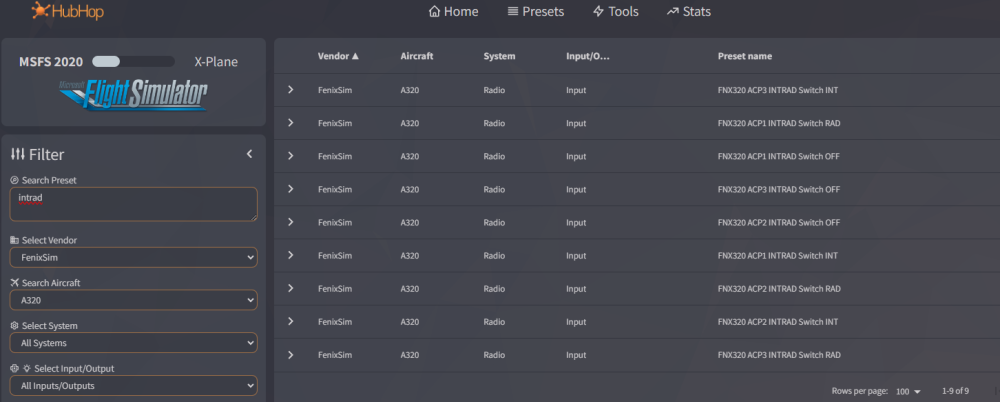
There are already presets defined for this: Check Select for Preset, click the Find Preset... button, and they are under MobiFlight->FenixSim->A320->Radio. John
-
What did the trick? I only entered your registration details and validated them to generate a key file for you...if the key now validates, you must have entered it incorrectly previously,
-
Newbie to FSUIPC. Who creates presets for the FSS B727-200?
John Dowson replied to Lord Farringdon's topic in FSUIPC7 MSFS
Still not got hold of the B727, but another user has posted the following presets for the cut-off levers - add them to your myevents.txt file (create this file if you don't have it): You can then assign to these by checking Select For Preset, click the Find Preset... button and they will be available under Personal-> FlightSim Studios -> B727 -> Fuel. -
Great! - thanks for the update. John
-
I really can't answer such a general question - all the information you need should be in the User manual, so start there. If you have any specific questions om assignments then I can respond. Read the section THE EASY STEP-by-STEP WAY TO CALIBRATE YOUR CONTROLS in the User manual. Calibrate the rudder and look into adding a 'Slope'. which is a response curve - see the User manual. FSUIPC does not interact with TrackIR - you calibrate TrackIR within the TrackIR application. John
-
Assigning letters to Devices problem
John Dowson replied to Ray Proudfoot's topic in FSUIPC Support Pete Dowson Modules
Hi Ray, I can't see anything assigned to device U - if you remove that entry, does it get added back? You should also consider: - updating to the latest version if FSUIPC6, 6.2.1 - using substrings for your aircraft profile names to catch all variants, rather than adding each variant/livery e.g. change to and update all your [Profile.xxx] sections similarly, using substrings that will catch all variants of the aircraft -
Controls "wild" until I move them around a bit
John Dowson replied to Matthew Twomey's topic in FSUIPC7 MSFS
Ok - thanks doe the update. -
You are adding some simvars to FSUIPC offsets using the myOffsets.txt file, and it is two of these that are causing those messages: Remove those from your myOffsets.txt file, Note also that the other FUELSYSTEM variables may also give issues when using an aircraft that doesn't use the new fuel system: John
-
Does this occur with all aircraft or just one or more? The only cause of such micro-stutters that I can think off is excessive logging by MSFS. Can you open the MSFS logging console (from the development menu - you need to switch-on devmode to see this, in the MSFS options). If you see lots of messages logged, please tell me what they say. Usually this is caused by requesting sim variables from the new Fuel or Electrical systems when using an aircraft that does not use these systems. Also please attach your FSUIPC7.log and FSUIPC7.ini files (from your FSUIPC7 installation folder) - no additional logging needed for the time being. Make sure you exit FSUIPC7 before attaching files, and you can zip/compress them if too large to attach.
-
This is how the forum is set-up and is nothing to do with me - I do not control/manage the forums, It is also quite common for such forums to have restrictions/limits for new users which increase over time. The initial low upload limit causes me a lot of issues as well, as I nearly always need to see either an ini or log file, and the initial limit doesn't allow for either (unless compressed). Ok.
-
It is no bother to me and I am not frustrated. However, I am always trying to reduce the time I am spending on support so that I can spend more time on other things, such as improving the functionality and documentation. If I continually have to answer or explain things further then the documentation is obviously not good enough and needs to be updated, otherwise I repeatedly get asked the same questions which is not only wastes my time but also that of my customers. I therefore like to clarify/update documentation (including FAQ entries) so that I can reduce such queries. I am therefore asking why it was not clear to you that you needed to set that ini parameter from the FAQ entry so that I can update it...
-
Your WASM log file shows this: If you have read the FAQ entry, it says to set LvarScanFrequency=0 Have you tried this? And can you tell me why the FAQ entry isn't c;lear on what to do about this...the FAQ entries are there so I don't have to explain this to every support request. If you can let me know why the FAQ entry for this isn't sufficient I can update it.... John
-
Did you not read my previous comment? Your WASM is crashing - please read the FAQ entry for this and follow those instructions.
-
@xkoote Did you manage to get this working yet using FSUIPC7? Also, do you know how to assign for the fuel cut-off levers in the B727?
-
@David123 Did you try the above or did you manage to sort out your issue, and if so, what was the problem?
-
Your upload limit will increase the more you post. If files are too large to attach, even when compressed, you can use a (free) file exchange service such as https://filetransfer.io/.