Thomas Richter
-
Posts
1,506 -
Joined
-
Last visited
-
Days Won
26
Content Type
Profiles
Forums
Events
Gallery
Downloads
Everything posted by Thomas Richter
-
FSUIPC Client DLL for .NET - Version 2.0
Thomas Richter replied to Paul Henty's topic in FSUIPC Client DLL for .NET
Hi Paul, perfect! Thanks a mill. -
FSUIPC Client DLL for .NET - Version 2.0
Thomas Richter replied to Paul Henty's topic in FSUIPC Client DLL for .NET
Hi Paul, thanks for the updated version 2.3. I'm working with both .Net2.0 and .Net4.0. The latest version is recognised in .Net4.0 but not in .Net2.0? -
FSUIPC 3.999z HELP
Thomas Richter replied to aaflyboy777's topic in FSUIPC Support Pete Dowson Modules
Hi, make sure you install with latest Install FSUIPC 3.999z2 not any version before like you may be did with 'FSUIPC 3.999z'. As there were windows updates two days ago it might be that windows removes the FSUIPC.dll because of the signature problem (used by a virus). -
Copy to FSUIPC .ini Problem.
Thomas Richter replied to Herb's topic in FSUIPC Support Pete Dowson Modules
Hi Did yoy see the missing number 10 (ten), should be in line I think (8 - 9 - 10 - 11 - ...). -
Hi 1. Did you use the Installer for FSUIPC to install? 2. Is your FSUIPC registered? I "think" you will need to to use PFC.dll. 3. Did you try to run without the PFC.dll, because of above?
-
Hi Just check this viewtopic.php?f=54&t=74550 It is may be what you are looking for and VB.NET is just similar to C#.NET.
-
FSUIPC Client DLL for .NET - Version 2.0
Thomas Richter replied to Paul Henty's topic in FSUIPC Client DLL for .NET
Hi Paul I'm writing in C# by using Visual Studio 2005 Pro version. For this your FSUIPCClient.dll works really perfect Just now I'm trying to use VC++. I just got it to work and it seems to work here as well okay :-) -
FSUIPC Client DLL for .NET - Version 2.0
Thomas Richter replied to Paul Henty's topic in FSUIPC Client DLL for .NET
Hi Paul Is it possible to use the DLL as well in VC++ like in C#? -
Problem To Get Variables from FSUIPC
Thomas Richter replied to Toppa80's topic in FSUIPC Support Pete Dowson Modules
Hi What you are using is the FSUIPC Client DLL by Paul Henty for Visual-Basic .NET. With (&H3364, 256) you try to read the Offset 0x3364 with 256 Byte length. Just read the Documention from Paul Henty and try the examples what is really very well described. The example code gives you also a clear way to follow to get anything you need to read from or write to FSUIPC. -
Help for retrieving FSUIPC version
Thomas Richter replied to luisgordo's topic in FSUIPC Support Pete Dowson Modules
Hi BCD is the Hex format! The current version of FSUIPC I use is 3.811. The HiWord 3306, 2 Byte length gives the value 14353 14353 to Hex gives the result 3811 :D -
Sim connect problem on FSX
Thomas Richter replied to humrod's topic in FSUIPC Support Pete Dowson Modules
Hi I think you mean version 4.28 but anyway. Just check the below link where it is described what is to do to get the correct Simconnect installation. viewtopic.php?f=54&t=58095 (Help with FSUIPC4 code signature problem) -
Hi This values just display how far you are out of Center (value = 0), as long the GS is captured. You need to read the GS available Offset as well to know that value zero means it is in Center or just that GS is not captured, then the value is of course zero too. ------------------- Best Regards Thomas Richter Info@technical-service-richter.de www.technical-service-richter.de thomas@projectmagenta.com support@projectmagenta.com
-
FSUIPC with Keyboard
Thomas Richter replied to pauloalarcon's topic in FSUIPC Support Pete Dowson Modules
Of Course yes, with Key assignments. That is all clearly described in the FSUIPC documentation. -
Goflight & pmSystems
Thomas Richter replied to jimthomasjohnston's topic in FSUIPC Support Pete Dowson Modules
There is the program GFDisplay from Pete that can control this. http://www.schiratti.com/files/dowson/GFdisplay.zip -
Just use the Offset 0x31E8, Water = value 2.
-
This is Graphic Card related. Do you use its latest driver?
-
FSX FSUIPC Saitek Rudder Pedals Breaks
Thomas Richter replied to wsieling's topic in FSUIPC Support Pete Dowson Modules
You need to select the REV checkbox for the Brake axis in FSUIPC. -
Altitude From FS?
Thomas Richter replied to homer09001's topic in FSUIPC Support Pete Dowson Modules
With Offset 3324 you can read ft or m, depends of FS setting. 3324, 4 This is the altimeter reading in feet (or metres, if the user is running with the preference for altitudes in metres), as a 32-bit signed integer. Please check offset 0C18 to determine when metres are used (0C18 contains ‘2’). The same value can be calculated from the actual altitude and the difference between the QNH and the altimeter “Kollsman” pressure setting, but this value ensures agreement. -
wide fs and IOCARDS and SIOC
Thomas Richter replied to mvc321's topic in FSUIPC Support Pete Dowson Modules
SIOC needs to be installed (for normal use with hardware) only on the PC where your hardware is connected to. You should in any case decide what connection to FS you would like to use. WideFS or IOCP, I would not use both at the same time! When you like to use WideFS, I prefer, remove IOCP (FS modules folder) and make sure in SIOC ini FSUIPC is selected and IOCP is deselected! Then you don't need any IP address because the connection works only by WideClient to FS with all is "advantage". -
PMRJ Weather Switch
Thomas Richter replied to RichardL's topic in FSUIPC Support Pete Dowson Modules
Hi Then just do it instead on the "Buttons + Switches" page, similar! -
PMRJ Weather Switch
Thomas Richter replied to RichardL's topic in FSUIPC Support Pete Dowson Modules
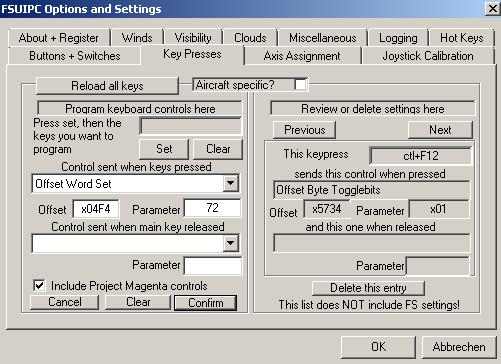
Hi Just use the Offset 04F4, length 2 Byte with value 72 to toggle WXR. To assign a key go to "Key Presses", press "Set" and then the Key you want to use for. See pic, don't forget to press "confirm" and then OK.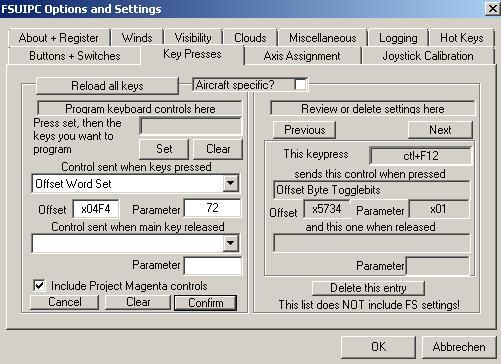
-
Hi What happens if you remove this CH Joystick? Is button 17 still shown as pressed?
-
modules menu in FSx help
Thomas Richter replied to mohammed's topic in FSUIPC Support Pete Dowson Modules
Hi Advdispl.dll was written for FSUIPC3.xx and doesn't work for FSUIPC4.xx. -
Hi It will be a problem of your gf module, hardware related.
-
Hi Pete and Peter The best way is ever learning by doing! -- If you never burned your fingers on a hotplate you will not understand what is "HOT" -- Questions are ever welcome and answered by Pete, Other (and me is also Others) as long it is visible there is a will of trying things but running into problems. FSUIPC is a technical tool that allows you to program/read/write values to/from FS, in many cases very complex internal manipulated so that it is really handy useable for customers. But it is ever needed to study the manuals to understand the key of this tool and the way to use it correct. The SDK of FSUIPC describes the most things as well for beginners. I think I can say this for Pete as well that is not the way only to ask every step/code to get things to work. And of course there is no time to do this, for me because of my work for Project Magenta and I "think" as well for Pete because his extensive activities on FSUIPC4 / 3 (without his work we would all stay a bit in the rain).