

Pete Dowson
-
Posts
38,265 -
Joined
-
Days Won
170
Content Type
Profiles
Forums
Events
Gallery
Downloads
Everything posted by Pete Dowson
-
Registered Owner Email Address Change
Pete Dowson replied to bdstorm's topic in FSUIPC Support Pete Dowson Modules
No. The name and email address (or street address for snailmail applicants) are tied to your Keys irrevocably. They are only used to uniquely identify you, they are not used for email or other purposes. Regards Pete -
Best solution for controlling LED outputs?
Pete Dowson replied to hnugent's topic in FSUIPC Support Pete Dowson Modules
You might want to ask this on the cockpit builder's Forum. viewforum.php?f=106 FSUIPC doesn't itself drive any display hardware, but any ready-made system will come with configurable driver software which may or may not use FSUIPC to get its information. Regards Pete -
copy button definitions from ini??
Pete Dowson replied to a topic in FSUIPC Support Pete Dowson Modules
Cut and paste the complete sections across. All of the INI stuff outside the [General] parameters (and of course the new sections for [WideServer], [AutoSave] and [GPSout]) are 100% compatible. Regards Pete -
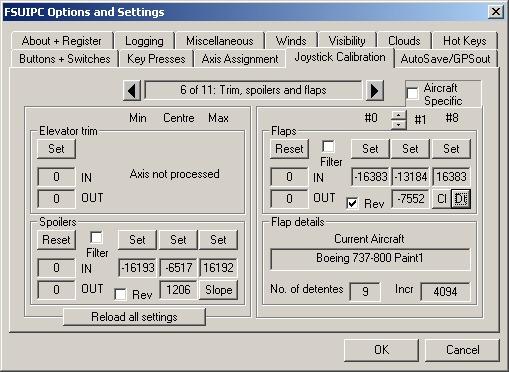
Huh? It should look like this. See the "Rev" check box? Maybe you are not calibrating in FSUIPC? If the top left button reads "Set" instead of "Reset" you've not calibrated it yet. Press that button. Please see the documentation. Regards Pete
-
FSX.exe version with FSUIPC installation
Pete Dowson replied to Ropipo's topic in FSUIPC Support Pete Dowson Modules
As it says, the version of SimConnect needed to load FSUIPC4, which should have been installed from the original FSX DVDs, is either not there at all or not installed correctly. Please see the FSX Help announcement at the top of this Forum for instructions on repairing it. Regards Pete -
Ooops! Sorry. I did my usual trick and replied to your last message using the "Edit" button instead of the "Quote" button. Hence your message got squished. Sorry. Well, I also find a lot of the stuff rather, er, arcane, to say the least. It isn't intuitive at all. Trial and error, with a capital ERROR, is the usual path taken. I think most of your compile errors will be down to a missing header (probably windows.h as I said) defining some of the types. A lot of the others will be "deprecated" library functions, like sprintf, strcpy, etc, and stronger typecasting in the more recent Microsoft development packages. Regards Pete
-
No, because these are implemented within an add-on, not in FS. I really cannot hack into add-ons to find out how to drive them. I don't even know how it works. That said, you can certainly program controls to operate in specific parts (i.e. notches) of an axis by assigning it through FSUIPC's axis assignment tab, and defining the axis ranges and actions to be taken on the right-hand side. I'm not sure what else you could possibly need. Regards Pete
-
Different versions of Microsoft C/C++ perform different checks. The "sprintf" problem, for instance, is that it is "deprecated" and they advice you to use "sprintf_s" instead. This is to do with security, as the result of a sprintf can overrun the destimnation buffer. The "_s" variants of many of the string operations are designed to stop this. Same with a lot of the typing. If you've not yet found any need to use casts when using Microsoft C to write Windows programs you've lived a very sheltered life! I'm afraid there's a lot needed. The example code in the SDK is intended to be READABLE. It doesn't have all those new complications. However, f you are a C programmer, you will understand them, and therefore will be able to edit your own code to siut your own compiler, whether it be Microsoft or whatever. The examples aren't meant to be YOUR projects, just show you what is involved. You need to know how to use YOUR development system. I think you are not understanding the evolution of C in the hands of Microsoft. Just learn the rules for your specific version and you'll be able to eliminate the warnings and errors. We've all had to do it. Oh, one other thing. The C examples in the SDK are C, not C++, though the Header does have a "C" declaration so it can be used in C++. The errors you list in FSUIPC_User.h appear to be due to the omission of the BOOL typedef. Did you forget to include the Windows.h before including the FSUIPC header? I can only post the same there. Regards Pete
-
SIMMARKET : Problems Buying FSUIPC4
Pete Dowson replied to VANHEES's topic in FSUIPC Support Pete Dowson Modules
In my experience ALL uses of credit cards need the name actually on the credit card. I don't know where you've shopped before that don't care about the name! :shock: They also want the address of the person, as known to the card issuers. Without some sort of ID security how could we trust the use of cards at all? We'd all be in a mess, reverting to hard currency again. ;-) Only one in Japanese, Intercraft. Check the payment options. There's many ways SimMarket can take your money. ;-) Pete -
Problems with calibration of throttle quadrant
Pete Dowson replied to andypanda's topic in FSUIPC Support Pete Dowson Modules
Actually, it was up there within about 30 minutes of my post, about three hours before your reply! ;-) Regards Pete -
Problems with calibration of throttle quadrant
Pete Dowson replied to andypanda's topic in FSUIPC Support Pete Dowson Modules
Okay, new video card in and working. I also took the opportunity to double my main memory to 2Gb whilst I had the box open -- makes debugging a lot smoother! ;-) I found the problem with the mapping to Throttle3 (and Prop and mixture). It was to do with the interception changes I made in 4.16. I didn't notice it because I tend to use Direct Axis assignments in FSUIPC, not assignments in FS or to FS controls in FSUIPC4. It worked okay then because the direct assignment doesn't need any interception from SimConnect in the first place. Anyway, it was easy to fix, so I've done so and I will be uploading an interim version, 4.162, to the "FSX Downloads" Announcement above as soon as I've compiled and verified the Release build. Thanks for reporting this. Oh, Thomas, if you are still following this thread. I tested the Direct assignment for SteeringTiller, and I can't make it fail. Are you by any chance using the undocumented INI assignment of a different axis? Or have you tried using the built-in nose wheel steering axis new to FSX (which I don't actually support in FSUIPC4 in any case)? Regards Pete -
But isn't it a matter of right-clicking on them, selecting Properties, and unchecking the read-only status? Regards, Pete
-
Check the "Rev" option in the Calibration section. Pete
-
That's weird. Stuff like that used to happen sometimes with Win95 if you copied stuff directly from a read-only medium (like a CDRom), but I've never heard of it happening spuriously since. It sounds like a bit of directory file corruption on disk. Also, in any case, if there was no "FSUIPC.DLL" already in the Modules folder, marked read-only, you should have been able to place your new copy there without a problem. It sounded more like the folder itself being so marked. Okay. Good. Well done. Regards Pete
-
Problems with calibration of throttle quadrant
Pete Dowson replied to andypanda's topic in FSUIPC Support Pete Dowson Modules
No, the tiller axis should be fine -- you'll need to give me more details. It is nothing to do with any mapping, which apears to be the problem reported in this thread. Regards Pete -
Switches module, home made, some questions.
Pete Dowson replied to ricoalc's topic in FSUIPC Support Pete Dowson Modules
Only offsets with multiple values in separate bits should be operated by "Setbits" and "Clrbits". For all the others you should use "Offset XXXX Set", where XXX is Byte, Word or Dword, depending on the size (1, 2, or 4 bytes). In the case of Gear you'd need "Offset Dword Set" with a parameter 0 for Up and 16383 for down. But in many cases, such as Gear, you are making it more complicated than it need be. Only resort to driving the offsets when there's no suitable FS control. Really the offsets are for application program use. Regards Pete -
Elite Throttles and FSUIPC4
Pete Dowson replied to fun2fly's topic in FSUIPC Support Pete Dowson Modules
There's never been any "search" button for throttle or any other detection. The joystick options in FSUIPC4 are identical to those in FSUIPC3, as is the interface offered to programs like Elite's driver. Please clarify what it is you think you cannot find. If you refer to and compare user guides for FSUIPC3 and 4 you will see that all the areas to do with buttons, axes, switches and keys are identical. I took a lot of care to be sure, so much so that you can transfer your FSUIPC3 settings form the INI file to your FSUIPC4.INI file. No, it isn't now -- they came good and paid a licensing fee. As far as FSUIPC4 and FSX are concerned, there's no difference whatsoever for the Elite driver. The only possibility I can think of is that they do some sort of Version check (either on FSUIPC version, or FS version) and fail when it doesn't match. If this is the case you probably need an update from Elite. Regards Pete -
Problems with calibration of throttle quadrant
Pete Dowson replied to andypanda's topic in FSUIPC Support Pete Dowson Modules
Agreed, looks okay. Maybe I've broken something. Unfortunately the video card is found to swap for the one which failed doesn't support FSX. I'm popping out first thing Monday morning to get a replacement card which will support FSX, and I'll test this then. Sorry for the delay. Regards Pete -
FSUIPC - HELP!
Pete Dowson replied to terrancepeterson's topic in FSUIPC Support Pete Dowson Modules
Yes, the FSX version of FSUIPC (FSUIPC4) is a new product and needs a new key to unlock all the facilities. Regards Pete -
FSUIPC - HELP!
Pete Dowson replied to terrancepeterson's topic in FSUIPC Support Pete Dowson Modules
It means your version of FS2004 is later than the version of FSUIPC you are using -- you are running FS9.1 whilst your FSUIPC is way out of date. Just download the current version (3.75) and install that. If you haven't just updated FS to FS9.1 it seems likely that you have installed some (pretty naughty!) product which installed an old version of FSUIPC without bothering to check whether you already had a later one. just install the current version. Regards Pete -
Problems with calibration of throttle quadrant
Pete Dowson replied to andypanda's topic in FSUIPC Support Pete Dowson Modules
Strange. Could you show me the relevant [JoystickCalibration] section of the FSUIPC4.INI files please? You'll find it in the FSX Modules folder. I'm unable to test this here a present as the video card on my test and development PC has just given up the ghost. I'll do some swapping with another machine as soon as I get time. Regards Pete -
Sorry, I've no idea. Certainly the files in the FSUIPC.ZIP are in no way protected against you extracting them. Maybe your Modules folder is write protected? Try changing folder access permissions. Pete
-
Switches module, home made, some questions.
Pete Dowson replied to ricoalc's topic in FSUIPC Support Pete Dowson Modules
Not terribly easily. Microsoft evidently didn't think these things important enough. But it can be done. You'd have to use the Offset Word Setbits or Offset Word Clrbits controls, with offset x0D0C and one of these parameters: 1 Navigation 2 Beacon 4 Landing 8 Taxi 16 Strobes 32 Instruments 64 Recognition 128 Wing 256 Logo 512 Cabin Use Setbits to turn a light on, Clrbits to turn it off. Well, the FS controls for this certainly work okay. Maybe you have the keypress repeating. Why don't you assign to a Control instead of a Keypress? It is most inefficient in any case to press a button to press a key to make FS send itself a control. By pass the keypress stuff and use controls directly. No, no need. Just set your plane up exactly as you want, then save a flight marking it as the default. Regards Pete -
Three calibration points? not normally. What calibration page are you looking at? There's a problem I don't understand then. What do you think a "centre" position on a mixture lever would do? How are you managing to calibrate three points on any of these. (There ARE pages with "centres" but they are for special purposes, like reverse ranges). What happens if you assign that lever to something else, like a normal throttle, then? Does it do the same? Does it EVER work correctly? Maybe the pot is bad, as I suggested? Regards Pete
-
Error 10038 in Wideserver
Pete Dowson replied to excalibur67's topic in FSUIPC Support Pete Dowson Modules
Could you show me the actual log please, both Server and Client. There should be text explaining 10038 -- these errors are not reported by my code, I just relay what the Windows network code reports. Regards Pete
