

John Dowson
-
Posts
13,780 -
Joined
-
Last visited
-
Days Won
288
Content Type
Profiles
Forums
Events
Gallery
Downloads
Everything posted by John Dowson
-
@sebgengen First, please do not hijack unrelated topics for random questions - create a new topic if you cannot find a suitable topic. Your question has nothing to do with the trial license, i.e only post here to get me yo generate a new trial license if the current one has expired. LINDA is a lua interface built on top of FSUIPC's lua interface, which requires a registered version of FSUIPC. For Saitek panels, you can also use SPAD (free) or SPAD.next (payware). John
-
Disable all controller input whilst in autopilot
John Dowson replied to Adamski's topic in FSUIPC7 MSFS
Please see offset 0x310A in the FSUIPC7 Offset status document (although some of the bit numbers seem to be missing, which I will correct): Controls the joystick connection to the main flight controls. Normally all zero, set the following bits to actually disconnect the specific joystick axes (from least significant bit = 0): 0 Elevator 1 Aileron 2 Rudder 3 Throttles (all). 4 See below (throttle sync control) 5 Elevator trim 6 Throttle #1 7 Throttle #2 (see next byte for others) This feature is intended for use in protecting autopilot flight from interference from axis flutter. In order to protect the user from a broken or crashed application, all the flags are cleared 10 seconds after they have been set, so applications will need to repeat the setting every few seconds. ... John -
This sounds strange to me. The flaps in the G58 have three positions: Down (DN light lit, lever down), APH (APH light lit, lever in central position) and up (no lights lit, lever in up position). Moving the lever in the UI will result in the 'IN TRANSIT' light to be lit while the flaps move, then goes off when in position. The flaps lever shouldn't move again from the position you set. If you assign to Flaps Up / Flaps Down, you can only switch between the UP and Down positions, and cannot set to APH. If you assign to Flaps Inc and Flaps Dec, you can move through all 3 positions, as in the UI. I don't think so as it seems to be working fine here. However, no controls are logged by FSUIPC when you move the lever in the UI, so internally it does look like its using something else, but this shouldn't matter as the external/SimConnect controls are working as expected as far as I can tell.. Check that you don't have assignments to flaps in MSFS - if assigning your controllers/devices in FSUIPC, best to start with an empty profile for that device in MSFS. John
-
@ZenMusicSoaringThe trial license has been updated, valid until 10th April 2022.
-
I just tried this in the G58 and assigning to Flaps Up/Down is working as expected here, so I'm not sure why that isn't working for you. Are they working from the UI? Your log shows these controls being sent/received ok, so it is strange that those aren't having any affect in the aircraft...
-
If you are planning on using the SDK, you don't need a registered version. Registration provides access to assignment facilities, the lua interface, etc - see the documentation for a full list of the additional facilities provided by the registered version. John
-
Yes, it is always available...you just need to post here if its out of date and I will generate a new one (as it says in the initial post). I'm finishing for the day now. I'll generate a new one either tomorrow or Sunday, when I get time... John
-
First, can you please not start a new log file when providing logs for support - it is easier to see what is happening in just one log file, you can always zip it if its too big to attach. Your settings for the view controls don't work as these controls are not working in MSFS. From the README.txt file (included in the FSUIPC zip file you downloaded): I'm not sure why the flaps controls aren't working as I would expect them to work in the Asobo Baron G58. Could it be that these are working but the inc/dec values are too small to notice? Try changing the flaps assignments and set 'Control to repeat while held' and see if that gives any movement. Otherwise, use the standard method to work out what controls are needed - activate logging for Events, move the flaps in the UI and see what events are logged in the FSUIPC7.log file (you can do this with the console window open using Log -> Open Console). Then try assigning to those. I can look into this later if you still have issues with this - let me know. Also be aware that many MSFS aircraft do not use standard controls and you have to use a combination of lvars/ hvars events and calculator code for many assignments. FSUIPC7 also now includes access to the MobiFlight presets which you can also assign to - see the MobiFlight HubHop resource (https://hubhop.mobiflight.com/) which has a good search interface for finding presets for many aircraft, both Asobo and add-ons. John
-
Ok, but that is strange. Usually once an offset is allocated to a simvar (or sim event for writes) it doesm't generally change. \in the documentation I have, viewpoint piyvh, bank and heading are at offset 0x83D4 and marked as 'FS2004 only' (i.e. FSUIPC3!). Yes. They are offset addresses into an FSUIPC byte array. No. They are populated from FS memory locations in earlier version of FSUIPC (i.e. hacked) , but from FSUIPC4 onwards they are populated using the SimConnect SDK. Once an offset is allocated for a particular simvar or function, we try to keep that offset allocated for the same simvar/function across all versions of FSUIPC, although this sometimes isn't possible. Cheers, John
-
Are you using an MSFS version from Steam or the MS Store? If using a steam version, please see the README.txt file included in the zip file you downloaded: If you are using an MS Store installed version, delete this file: C:\Users\Pc\AppData\Roaming\Microsoft Flight Simulator\UserCfg.opt Also, please make sure that you extract the files from the zip file you downloaded before running them. From the log file you attached, it looks like you are trying to run the installer directly from the zip file (windows allows you to do this for some reason) - this can cause issues: John
-
Yes, better to use one function rather than two. However, two (or multiple) events on a key or button shouldn't be a problem really, but I cannot confirm that for FSUIPC3 - that may be restricted to a single event per keysytoke/button (and per lua thread). John
-
May not be there in FSUIPC3 - best to check. This really isn't the place for programming basics... The values are passed to the function via its parameters. The third parameter contains the downup value (hance this is why we call the variable that holds this downup) as an integer (not a bit), with possible values described in the documentation. Not sure what this means - 'bypass the downup function'? there is no 'downup function'... And event handling functions don't return anything. Did you not see my example above: I suggest that you look at some of the example lua scripts provided, or check out some of the user contributed lua scripts (see the User Contributions sub-forum). John
-
Thanks for sharing. Could you possibly create a post in the User Contributions section and attach your wiring and configuration diagrams directly to the post rather than linking to a shared (google) drive? The problem with such link is they tend to not last that long. You can also reference this topic for further details. Thanks and regards, John
-
I don't know why you have attached 3 useless log files.... Can you please not start a new log file, there is no need. Your axis assignments now look very strange: You have multiple assignments to mixture 1 set (13 - 2 assignments), mixture 2 set (14 - 4 assignments), etc And your calibration looks even stranger: There is no calibration to the axes you have assigned (e.g. mixture 1 set), and you have strange throttle calibration which you haven't even assigned. I suggest that you read the user guide and start again. Read the section 'The Easy Step-by-Step Way to Calibrate Your Controls'. If you want further help after trying to assign and calibrate your controls correctly, show me the updated ini and a single log file where you have activated the correct logging (i.e. axes controls if your issue is with axes) and showing your issue (i.e. move the assigned axis through its full range) together with a relevant description of the problem. The set-up for ax axis assignment for the Honeycomb Bravo is exactly the same as you would do it for any other device, such as your old CH throttle, so I really don't understand why you are having such difficulty. John
-
Exactly - you need the hex value as offset 0x311A is a BCD value - Binary Coded Decimal. So, as the example given in the offset status document, a value of 0x2345 would indicate a frequency of 123.45. If you use the decimal value, you will get the wrong frequency. If you want the frequency as a decimal, use offset 0x05CC instead. It is a value that will be stored in the variable. If you use "(apple, peach, spaghetti)", the downup value will be stored in the variable 'spaghetti'. Always better to scope variables. Functions have parameters that are passed to them. How would you know the value otherwise? You could declare a 'downup' variable in the script, but it won't have the downup value needed when the function is called/triggered (unless you declare that again as the correct function parameter). John
-
You shouldn't need repeat, as the key is assigned to press & hold on the client. Also, using the same key (F1) to send from the host to the client and also to activate PTT on the client works ok for now, but I recommend that you use a different key. Currently its ok to do this as I remove the keyboard focus on the client before I send the PTT key, so there is no loop (i.e. the key press being sent by the client is not received by the client), but this could possibly change in the future, although I have no plans to change this at the moment. John
-
👍
-
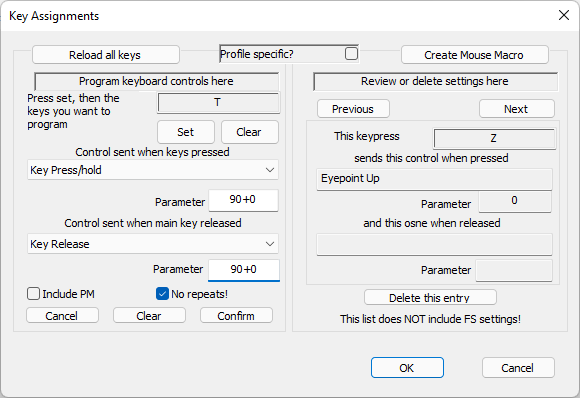
Can you please try with the attached FSUIPC7 version below, v7.3.2a. To set up PTT on a client PC with P2A, follow the following steps: 1. Assign a hot key in P2A for PTT. For this example, I will use the z key. Note that this IS NOT the key that you will use to activate PTT, but the key that FSUIPC7 will use. 2. In FSUIPC7 on the client PC, go into the 'Key Assignments' panel and assign the key you want to use for PTT to the 'Key Press/hold' event on keys pressed, and to the 'Key Release' event on keys released. You will need to know the virtual keycode number of the key assigned in step 1. I used the 'z' key, which has a vk code of 90, so my assignment to the 'T' key looks like the following (left-hand side, note also check for 'No Repeats'): If you do this, PTT should activate when using the assigned key ('T' in this example) on both the MSFS host PC as well as the client. I also fixed the focus issue, so it shouldn't matter where the input focus is on the client PC for this to work. Let me know how it goes. John FSUIPC7.exe
-
Also, maybe try just one event function, e.g function keyUpDown(keycode, shifts, downup) if downup == 1 then ipc.lineDisplay("Key Down") elseif downup == 0 then ipc.lineDisplay("Key Up") end end event.key(k,0,3,"keyUpDown") And if you don't want key events handled in lua to also be forwarded to the FS, use the LuaTrapKeyEvent ini parameter: John
-
All those errors are from custom events (i.e between 32768 - 65791). Are they trying to use custom events which haven't been made known to FSUIPC via a *.evt file? FSUIPC will only report the lvars it finds, with a maximum of 2044 lvars. If they are not all initially received, then increase the LvarScanDelay parameter in the WASM ini file. John
-
That looks like it should be ok (except it looks like you are using 'o' instead of '0' for the shifts parameter....) but it is always better to attach your full lua script so that I can check it. Rather than using ipc.linedisplay, its easier to use ipc.log and keep the logging console open when debugging lua scripts. You can then also use the log Lua Plugins function to see what is happening when debugging lua scripts. And always better to follow the documentation, and so your handling functions should be of the form: function keyDown(keycode, shifts, downup) ... end This is not correct - you need to use either 0x311A or "311A" This is also incorrect - use the string.format function to get a hex representation of the string and then prepend the 1 - something like comDisp = string.format("1%04x", ipc.readUW(0x311A)) Not sure what you mean by this, but its really up to you. You can have an assignment to a key/button in FSUIPC and an event on the same key/button if you like, although that is a a strange thing to do (but can sometimes be required). You would usually either use an FSUIPC assignment or a lua event-based script, not both. If you are controlling via lua, you don't need any assignments. You should auto-start event-based luas from the FSUIPC ini [Auto] or profile [Auto.xxxx] sections. Not sure what you are trying to say here, but I do not support SPAD. John
-
See the Advanced User Guide, the sections on Compound Button Conditions and Adding Offset Conditions - more likely the former for what you want to do. John
-
This can be done using compound button conditions - see the Advanced User guide. I don't know why they would say that - do you have a link to this so that I can comment? I posted on how to set-up the bravo for this with standard FS controls (not using the more complex lvar/hvar.calc code or presets that you will need to use for the CRJ). You can take a look at this and then adapt (i.e. set up a CRJ profile and adjust the controls used for this aircraft) - see Check the MobiFlight Hub Hop preset list (https://hubhop.mobiflight.com/) for the presets to use for the CRJ. John
-
I have this working now, but with a caveat...it is only working when FSUIPC7 on the client PC doesn't have the window input focus - the focus can be on any other window except for the FSUIPC7 main window. Not sure why this is at the moment, I will look to see if I can correct this. The solution doesn't use lua, but you need a new version of FSUIPC7 with keyboard input/forwarding activated on the FSUIPC7 client (this is currently disabled). I will look into this further tomorrow (have to finish now) and I'll post you an updated version to test with instructions on how to set this up. John
-
Aerosoft CRJ - Button Assignments not working
John Dowson replied to jackmill's topic in FSUIPC7 MSFS
It looks like you either don't have the FSUIPC7 WASM module installed, or it is installed but not activated. Presets use calculator code that require the WASM module installed and activated. John
