

Thomas Richter
-
Posts
1,506 -
Joined
-
Last visited
-
Days Won
26
Content Type
Profiles
Forums
Events
Gallery
Downloads
Everything posted by Thomas Richter
-
Hi, also make sure you use latest FSUIPC4.962a. Thomas
-
FSUIPC & X-Plane 10 or Xplane 11
Thomas Richter replied to andremgomes's topic in FSUIPC Support Pete Dowson Modules
Hi, FSUIPC and FSUIPC4 is for FS and P3D only. You are looking for XUIPC http://www.tosi-online.de/XPUIPC/Home.html Thomas -
Hi, the easiest way is to check both combined: - 0x3365,1 if is in "Menu or Dialog" or 0x0264,2 if FS is paused - if so stop reading any other values In case any AC is different just calculate the volume with the % level, works very precise. But I actually don't know if Paul implemented a helper class for that, the other way was always easy enough. Thomas
-
FSUIPC4 Installer for FSX &P3D
Thomas Richter replied to electricclay2000's topic in FSUIPC Support Pete Dowson Modules
Hi , as you can see in the Install log there is a little bit of a mess in your registry. Also you have a FSX.exe in P3D folder, that shouldn't be there! Thomas -
Computer Upgrade, FSUIPC problems
Thomas Richter replied to Rick Hirsch's topic in FSUIPC Support Pete Dowson Modules
Also the FSUIPC4.log file shows it did already run Ok and also closed correct when the session had finished. Thomas -
Computer Upgrade, FSUIPC problems
Thomas Richter replied to Rick Hirsch's topic in FSUIPC Support Pete Dowson Modules
Hi, just press Ok / confirm to run. That is needed to register FSUIPC4 as trusted in FSX.cfg file. It will ask/ tell that only once (which each new installed version of any DLL file like FSUIPC or other add-ons). Thomas -
Steering Set vs Steering Tiller?
Thomas Richter replied to AngeloCosma's topic in FSUIPC Support Pete Dowson Modules
Hi, Did you select the Send to FS ... before you select the function? - press Rescan button and move axis - when correct axis is captured press Clear button beside the Rescan button - now select the Type of action required and then the Steering Set Thomas -
Computer Upgrade, FSUIPC problems
Thomas Richter replied to Rick Hirsch's topic in FSUIPC Support Pete Dowson Modules
It is too small to read, maybe you can write out what it says instead please? The Event explorer of windows will tell when a App (like FSX) did crash with detailed information. The FSUIPC4.log file you will find in your main FSX folder in subfolder Modules, actually from your install log file: C:\Program Files (x86)\Steam\steamapps\common\FSX\Modules\ just copy the full content of that file and paste it into your message here. Thomas -
Computer Upgrade, FSUIPC problems
Thomas Richter replied to Rick Hirsch's topic in FSUIPC Support Pete Dowson Modules
Hi, FSUIPC4 installed OK into FSX-SE as the log file shows, over a already existing FSUIPC4.961. 1. The Windows crash log would be needed, from Event Explorer 2. The FSUIPC4.log file would also be needed please 3. What crash message do you get? Thomas -
Hi, you can confirm that with yes, so FSUIPC4 will be registered in FSX.cfg as 'trusted'. You get this info/ question when you install a newer version of FSUIPC4 or any other unknown DLL to FSX. Thomas
-
Steering Set vs Steering Tiller?
Thomas Richter replied to AngeloCosma's topic in FSUIPC Support Pete Dowson Modules
Hi, works ok. Make sure you have the correct axis assigned, you need to see of course already the In/ Out value in the first place! If not, when moving the axis you need to press Rescan to get the correct axis you want to assign. Thomas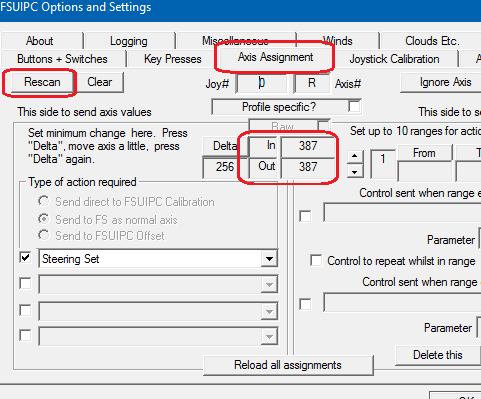
-
Hi, PMDG uses SimConnect only, so does AS16 and also vPilot. One of those would be the one. Thomas
-
Hi, for i.e. Prepar3D v3 in YourDriveAndPath\Prepar3D v3\redist\Interface\ Thomas
-
Hi, that is definitely not related to FSUIPC because it doesn't use .Net Framework at all. SimConnect version 10.0.61242.0 is FSX SP1, very strange that that is still used or RAAS is looking for? Thomas
-
Trigger/pickle mapping VRS Superbug
Thomas Richter replied to Quax1's topic in FSUIPC Support Pete Dowson Modules
Hi, still you didn't explain your problem? Btw- all logs are dated 09.10.2016, very old already? Also the FSUIPC4 version you use is far out of date, you should update to latest version first please. ********* FSUIPC4, Version 4.955c (14th June 2016) by Pete Dowson ********* ... 47 System time = 09/10/2016 18:04:45 ... Thomas -
Hi, roughly said, WideClient (via WideFS as part of FSUIPC) extends FSUIPC Offsets and partly functionality to networked PC's.. That would be a function of WideView by Luciano Napolitano http://www.wideview.it/, not WideFS. Thomas
-
LUA - do I need to take it out of ZIP folder?
Thomas Richter replied to st1322's topic in FSUIPC Support Pete Dowson Modules
Hi, yes of course. Please make sure you also read the FSUIPC Lua Plug-Ins.pdf, located in the same folder where you found the ZIP file. It will already answer that question and also how to start/ run it within FSUIPC. Thomas -
Hi, Did you check the Windows Firewall is not active blocking the WideClient connection on the Client PC (Win10) ? Thomas
-
Hi, I found best to connect with Win8.x and Win10 is to use in [Config] section of WideClient.ini the ServerName= option For example my Server Name of the FS-PC is TSR-DEV, so it looks like [Config] ServerName=TSR-DEV ... Thomas
-
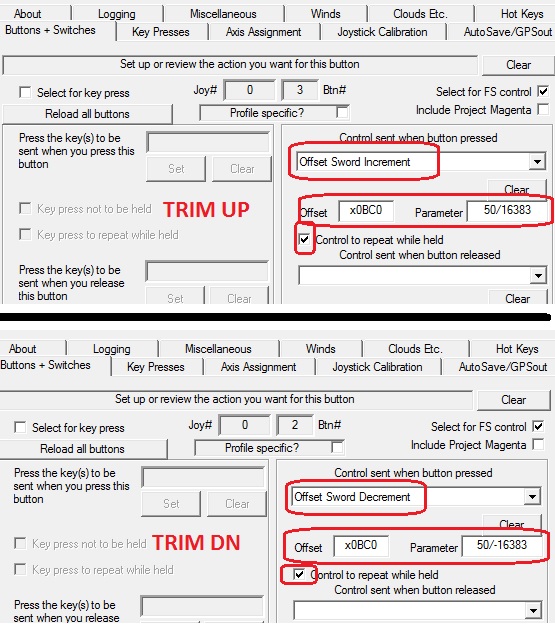
Hi, I have here the A2A C172 and use the trim of course with FSUIPC4. Make sure you have the FS controls of your controller (in controls) deleted or the whole 'Controls' deactivated ! In FSUIPC4 I don't use ElevTrim Up/ ElecTrim DN but Offset SWord Increment and Offset SWord Decrement to control the trim with the speed (value) I like. The used Offset is 0x0BC0 (Elevator Trim Set). I use here i.e. a value of 50 to increase and decrease the trim, that looks like this: Thomas
-
Hi, definitely there, between Starter 4 Set and Strobes Set. Thomas
-
Register Version 4.953 of FSUIPC4.dll
Thomas Richter replied to Dash 8 Herb's topic in FSUIPC Support Pete Dowson Modules
Hi, to register FSUIPC4 or FSUIPC+WideFS there is no need of internet access. After you bought a registration key just copy and paste the information i.e. to a text file and copy that text file to your FS-PC. When running the FSUIPC4 installer copy and paste the information into the fields rather than typing to avoid type or reading errors. PMDG doesn't use FSUIPC, it communicates via SimConnect direct with FS/P3D. Thomas -
FSUIPC 4959 update
Thomas Richter replied to Desiderio's topic in FSUIPC Support Pete Dowson Modules
Hi, WideFS(7) is part of FSUIPC4 that means it is inside FSUIPC4. So when you update to latest FSUIPC4 you have automatically latest WidFS7. The only thing you should then as well is updating WideClient on your client PC's to latest version. But same thing as with FSUIPC4, WideClient when replacing it with a newer version will NOT change settings in its INI file, so its save to do so. Just copy and paste the files out of the ZIP into the WideClient folder on your Client PC's. WideClient 6.999z2 BTW- It is always good practice to have a copy of any INI and CFG file from FSUIPC4.ini / WideClient.ini / P3D.cfg ... just in case a possible change you might have done doesn't work or something goes wrong, so you can always revert or crosscheck. Thomas -
FSUIPC 4959 update
Thomas Richter replied to Desiderio's topic in FSUIPC Support Pete Dowson Modules
Hi, the FSUIPC4 version number of your installed FSUIPC4 you will find in the FSUIPC4.log file (you can open with any text editor, i.e. Windows Editor). The file is located in your P3D main folder\Modules\ (i.e. YourDrive:\Prepar3D v3\Modules\). Direct in its first line i.e. ********* FSUIPC4, Version 4.959 ... You should be able to access the file i.e. from your Instructor Station PC over the network, normally you have to Share the FS folder. But if your version is older than 4.959 you have to use the installer in any case. Most correct information about behaviour of FSUIPC you will get / find here in the forum! FSUIPC4 Installer does NOT modify or create a new INI file or it's content like your settings/ definitions/ calibrations. DownLoads There are free programs like TeamView or TightVNC you can handle your Server PC(FS) from a different PC, that's was the very most with a FlightSim do/ use. No need to change your screen setup or anything!! Thomas -
Hi, looking at function Armrest_Toggle() ipc.writeLvar(nToggleVal(ipc.readLvar("L:Twot_Armrest"), 0, 1)) end the write should of course have the L:"LVariablename" you want to write to but you don't supply any, just the returned nVal1 !? ipc.writeLvar(“name”, n) Thomas
