

John Dowson
-
Posts
13,778 -
Joined
-
Last visited
-
Days Won
288
Content Type
Profiles
Forums
Events
Gallery
Downloads
Everything posted by John Dowson
-
I've corrected the problem with multiple *.evt files in the attached version. v7.0.5a. Its probably a good idea to make one evt file per instrument (e.g. G1000.evt, G3000.evt, etc) and then just add the event files for the instruments you use. John FSUIPC7.exe
-
It is working, but with restrictions (only use one *.evt file at the moment). Those are lvars, not events, so currently not possible to use. John
-
I don't know, but if the SPAD.next WASM module works in the same way as the MobiFlight one, I don't see why not. You need to determine what are the string names that SPAD.next is using (your ??????). Do they publish them?
-
@Stinger2k3 Ok Keith, but also note my post above about using two event files. I will look into this, but for the time being its probably best just to use one event file. John
-
Yes. You need to install and run it initially, to enable beta updates and to download the WASM module. Once that is done and you have placed the WASM folder in the community folder, you don't need to run Mobiflight anymore. Just follow the instructions here. John
-
There seems to be an issue using both event files, in that if you assign to a control provided by one of the files, the event with the same index number in the second file is also triggered. I will investigate, but for the time being please just use one event file containing the events needed. John
-
Here are two event files that contain all of the MobiFlight events: MobiFlight-Events2.evtMobiFlight-Events1.evt For users who want to try these with the MobiFlight WASM module to control the G1000, please see: https://forums.flightsimulator.com/t/full-g1000-control-now-with-mobiflight/348509 John
-
Any valid offset for seatbelts and smoking sign a320 fwb?
John Dowson replied to alesj97's topic in FSUIPC7 MSFS
I said 'There is currently no way to access lvars in FSUIPC7. '! i.e. not at the moment! Thats what I mean by currently! I'm not angry, sorry if it came across that way. Its just that, as I said, you seem to be asking me the same question that I answered for you a few days ago, and I'm not sure why or if I am misunderstanding you, or you have misunderstood my previous comment on this matter.... John -
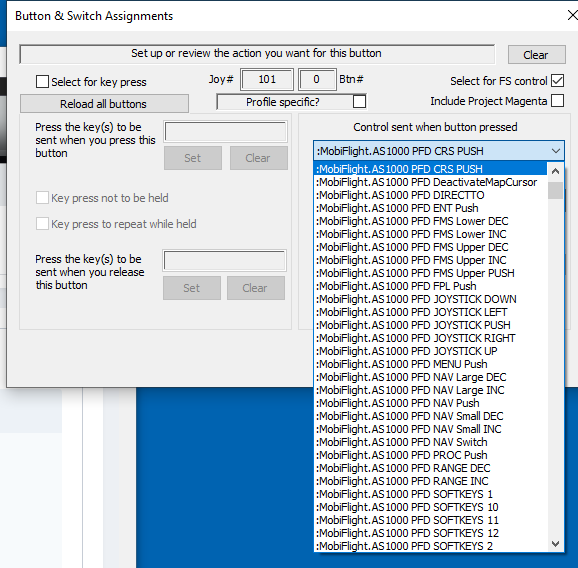
@Stinger2k3 You can use the MobiFlight events by creating an *.evt file with the events you want to use, and they will then appear in the FSUIPC assignments drop-downs. See my latest post on this here: I will look into providing some event files for all of these MobiFlight events. John
-
I just tried this and it works - I see the events in the dropdown list (at the beginning): I've attached the event file I have used (I've just added the first 54 events for the time being):MobiFlight-Events1.evt John
-
Any valid offset for seatbelts and smoking sign a320 fwb?
John Dowson replied to alesj97's topic in FSUIPC7 MSFS
There is currently no way to access lvars in FSUIPC7. This is a facility that I need to look into. So its not yet possible. Of course, once I have implemented access to lvars, you can do with them what you wish, including using them to populate user offsets. I have said this all before, so I just don't understand why you keep on asking the same question ion different topics! Is there anything not clear in what I have said about this? John -
Any valid offset for seatbelts and smoking sign a320 fwb?
John Dowson replied to alesj97's topic in FSUIPC7 MSFS
Which just re-iterates what I just said: Sorry, but I don't understand what you are asking, or why you are asking the same question again... John -
Any valid offset for seatbelts and smoking sign a320 fwb?
John Dowson replied to alesj97's topic in FSUIPC7 MSFS
Map them how? There is currently no way to access lvars from FSUIPC7. John -
Is this after the latest Asobo update? I've not looked at this yet, but I'll take a look shortly... Yes - I get the same behavior. For me, it only goes into reverse thrust if I toggle when I have some forward thrust applied, but then any movement reverts back to forward thrust. I will report this to Asobo. John
-
Could you also let me know the name of the PMDG header file that contains a description of the rotor brake parameters that you are using, I don't have the PMDG aircraft but I should have the header files around somewhere... John
-
Ok, glad your problem is solved. FSUIPC always uses the class name FS98MAIN - for the dll version (FSUIPC4,5,6) it subclasses the FS class window, but for FSUIPC7 it creates its own. John
-
As you are using Files for profiles, can you also attach your ini file for your B738U profile please. Your log shows that you are using the ROTOR_BRAKE control with various parameters. Are these valid for the PMDG aircraft? I thought PMDG used lvars together with its own FSUIPC offset area, not rotor brake codes which are used by FSLabs and others. Also, which logging entries (if any) show the correct increments when using the mouse? John
-
I'm not sure why that mouse macro isn't working. You could try with a different mouse flag, or use multiple actions. e.g. try with: or John
-
Can't Register FSUIPC7, Directed Here fFrom Simmarket Support
John Dowson replied to granathg's topic in FSUIPC7 MSFS
I have deleted your post post as it published your registration details. NEVER publish your egistration details on a public forum or your key will be invalidated. I've sent you a PM. You need to uninstall the 2015, 2017 and 2019 versions (any and all that you have installed), then install the 2015 + 2017 + 2019 combo package from here: https://support.microsoft.com/en-us/help/2977003/the-latest-supported-visual-c-downloads John -
Auto-save is already implemented. However, there are currently issues with the MSFS SDK functions that are used to save and load flights - from the SDK documentation: It won't be possible to use the auto-save feature until Asobo have fixed these issues. John
-
MSFS - FSUIPC 7+ - Issue with OS and sim app focus
John Dowson replied to canuck21a's topic in FSUIPC7 MSFS
Yes, sounds strange...I've no idea what's occurring. Keep the logging activated, and send me the files the next time you experience your issue. John -
MSFS - FSUIPC 7+ - Issue with OS and sim app focus
John Dowson replied to canuck21a's topic in FSUIPC7 MSFS
Yes, your description of the tests indicates that this is somehow causing your issue. Ok, please do. And attach you FSUIPC7.ini as well. John -
There has been a few posts on the MobiGlight WASM module recently, most recently here: Looks very interesting. I'm going to look into this next week to understand this better and see what I can do in FSUIPC7. I'll let you know - please be patient. John
-
I've heard this mentioned a few times now, most recently here: Thanks for the link. I will look into this shortly to see what I can do. John
-
Hi Norman, Looks like a Linda issue, so you should post in the Linda forums: https://www.avsim.com/forums/forum/429-linda-support/ John