

Thomas Richter
-
Posts
1,506 -
Joined
-
Last visited
-
Days Won
26
Content Type
Profiles
Forums
Events
Gallery
Downloads
Everything posted by Thomas Richter
-
Hi, please send the full log file, not only a fraction. Do you maybe have AutoSave active? AutoSaveEnabled=Yes Thomas
-
Hi, please check the top topic as it describes that you need to use the latest FSUIPC3 installer from 2016 on. Thomas
-
Installation Issue FSUIPC-Fs9
Thomas Richter replied to CRV's topic in FSUIPC Support Pete Dowson Modules
Hi, you are running/ installed a old version that will not work as registered anymore since 2016, see info above FSUIPC3: New registrations for 2016 will need FSUIPC version 3.999z9b Just update to latest version from Download Links page, top of the forum. Thomas -
Hi, ... Anyway I have the version 4.09 and there is no sign of a log file in those places. ... FSUIPC4.09 is actually from April 2007 ! First of all you need to install latest Installer FSUIPC4.955
-
Assign buttons to transponder code
Thomas Richter replied to scm@smurn.org's topic in FSUIPC Support Pete Dowson Modules
Hi, no, it is the only to use some conversation math and simplest way I can think of is to use Lua, as it is implemented in FSUIPC. Thomas -
Assign buttons to transponder code
Thomas Richter replied to scm@smurn.org's topic in FSUIPC Support Pete Dowson Modules
Hi, just check the FSUIPC4 Offsets Status.pdf (located in ..\Modules\FSUIPC Documents folder) for the following Offset. 0354, 2, Transponder setting, 4 digits in BCD format: 0x1200 means 1200 on the dials. Thomas -
Not far off binning project
Thomas Richter replied to Jateu_01's topic in FSUIPC Support Pete Dowson Modules
Hi, these Offsets are hex address and operate bits. 561A Bit 0 for Cutoff1 561A Bit 1 for Cutoff2 The only 'other' Offsets are the FS Offsets listed in the FSUIPC4 Offsets Status.pdf as Mixture (located in ..\Modules\FSUIPC Documents folder), but they are Values not Bits. May be Sim-Avionics uses there own Offsets/ Bits for Cutoff Lever? Thomas -
Hi, make sure you disabled Controller in FS in Controller Settings, also as Hotkey available CTRL+K (toggle). Thomas
-
Not far off binning project
Thomas Richter replied to Jateu_01's topic in FSUIPC Support Pete Dowson Modules
Hi, Throttle offsets will be the FS ones, 088C 2 Engine 1 Throttle lever, –4096 to +16384 0924 2 Engine 2 Throttle lever, –4096 to +16384 The Cutoff lever Offsets will be the Project Magenta ones, CS driver has to run of course. 561A Bit 0 for Cutoff1 561A Bit 1 for Cutoff2 Thomas -
FSUIPC Installer and dll.xml
Thomas Richter replied to Roland's topic in FSUIPC Support Pete Dowson Modules
Hi, the problem is mostly the migration tool that fakes a installed FSX version in P3D folder. You should find any information about the problem in the Installer log file, located in Moduls folder and the folder where the installer was running from. Just copy and paste the content of the FSUIPC4 Install.log into a message here. Thomas -
P3D V 3.2 & FSUIPC log, how?
Thomas Richter replied to PHII33's topic in FSUIPC Support Pete Dowson Modules
Hi, Thank tou Thomas, first though I wonder why your reply didn't generate an email to me as other forums do? Don't know, I would expect it depends on your settings for the forum. So you're saying it's a different box I have to tick in P3D than the one in FSX? Settings for FSX and P3D are the same. If you don't use Log Extras then it will show at the end of the log after closing FS. E.g. here: Minimum available memory recorded was 3019Mb If you set Log Extras then it will log all the time depending on interval setting, e.g. here: 21344 Advanced Weather Interface Enabled 63000 Memory in use: 1682Mb, Avail=2414Mb 123188 Memory in use: 1682Mb, Avail=2414Mb 183359 Memory in use: 1682Mb, Avail=2414Mb 243500 Memory in use: 1682Mb, Avail=2414Mb 303672 Memory in use: 1677Mb, Avail=2418Mb 363875 Memory in use: 1823Mb, Avail=2273Mb 424125 Memory in use: 1826Mb, Avail=2270Mb 484344 Memory in use: 1837Mb, Avail=2259Mb 544516 Memory in use: 1865Mb, Avail=2231Mb 604781 Memory in use: 1902Mb, Avail=2194Mb 665000 Memory in use: 1918Mb, Avail=2178Mb 725234 Memory in use: 1933Mb, Avail=2163Mb 785453 Memory in use: 1933Mb, Avail=2163Mb 845656 Memory in use: 1929Mb, Avail=2167Mb Does your log file show after closing FS the Minimum available memory recorded was xxxxMb ? Thomas -
MJC Q400 Rudder Trim offsets
Thomas Richter replied to elsmoko's topic in FSUIPC Support Pete Dowson Modules
Hi, they are not lines you can place into the INI file. Just go to FSUIPC4 Button + Switches tab and press the button for Rudder-Trim left, then select as it shows in ButtonOffset_Decr (second pic). Then press the button for Rudder-Trim right, then select as it shows in ButtonOffset_Incr (first pic). Regards Thomas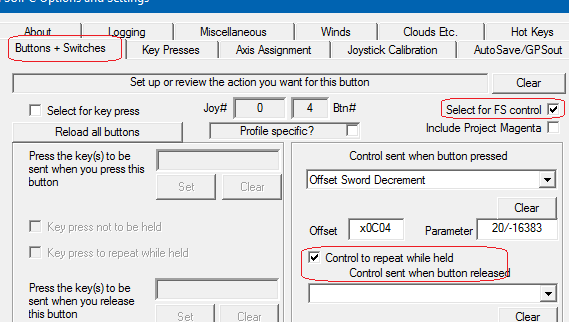

-
P3D V 3.2 & FSUIPC log, how?
Thomas Richter replied to PHII33's topic in FSUIPC Support Pete Dowson Modules
Hi, FSUIPC4 always creates a Log file. Check the Log Extras box that will log the Memory in Use continuously (depending on interval setting). Regards Thomas -
Installing Fsuipc 4.955 for FSX SE and P3d
Thomas Richter replied to RogCamp's topic in FSUIPC Support Pete Dowson Modules
Hi, when you run the installer FSUIPC4.955 it will install the latest FSUIPC into your FSX-SE and P3D, actually into any installed FS version. It will NOT change any settings of your existing FSUIPC installation of FSX-SE. Make sure you run P3D once before you run the FSUIPC4 installer. Regards Thomas -
Hi, I have FSX with FSUIPC 4.955 not working. this might not be the right wording as already the attached INI file shows it is working. You always need to attach the latest FSUIPC4 log file. Can you see and calibrate that controller in Windows Controller panel (in Systems panel)? Regards Thomas
-
Problems with Wide FS 6.70
Thomas Richter replied to Wonder's topic in FSUIPC Support Pete Dowson Modules
Hi, in addition to Pete. Make sure you didn't create a Homegroup on your Win7 PC, because XP and older cannot access those. -
Hi, it's the TQ that normally has two USB connections. Still you didn't say if there is one of those drivers running at all? Also where are the throttle lever defined, speed brake and flaps lever?
-
Hi, the RevSim TQ has normally two USB connections. One connects the special board operates by one of the drivers and the other is seen as a joystick card. The one seen as a joystick card will still be recognized by Windows as a joystick card as so by FSUIPC. The card that is seen as a joystick card is the one that connects to the REV lever and other buttons. Thomas
-
Hi, when it was registered already before then there is no need to register it again. Also how do you know it is not registered? There should be FSUIPC4.key file in modules folder with your registration info. !! Never show or attach your registration info !! Thomas
-
Hi, if I remember correct only the Reverser and different Buttons have to be defined/ calibrated via FSUIPC. The both throttle lever were connected to a Opencockpit card, SIOC driven (Opencockpits software driver), or Revolution Simproducts driver (Throttle Quadrant Driver). How are the Throttel lever calibrated, should be the above way (the only one I know of) but maybe there is a different way I don't know? As You described in your first post you defined/ calibrated only the Reverser and various functions that's why I guess there is a driver that handles the other functions already. Just check if something like described, SIOC or Throttle Quadrant Driver, is running and close the program before trying to go into FSUIPC. Thomas
-
Hi, in case you say you use a RevSim throttle, make sure you disable its driver. Depending on which hardware version, RevSim driver or Opencockpits software. Thomas
-
Hi, in case they are not listed in FSX then they will not be recognized in FSUIPC as it uses the same Windows api. As the manufacturer says, 12bit "plug and play" ( HID ) driver, compatible with Windows XP/Vista/7/8/8.1/10 * they should work without any additional driver. First step is to check they are seen in Windows Game-Controller-Settings and that you can calibrate them their. If they are not seen at all in Windows then there must be a fault. Also make sure you use the correct USB port, some hardware that is USB2 doesn't work connected to USB3 (blue socket) ports. Thomas
-
Hi, if you have pmSystems software you will be able to read any of the offsets and its variable name when you select in pmSystems menu 'Show Variable Name'. Thomas
-
Hi, used Offsets your Cockpitsonic OVHD are defined in their driver and related to the software they intended to use. That will be Project Magenta as far as I know. A Offset list for Led's, Switches and Gauges should be available from Cockpitsonic or Project Magenta.
-
yoke recenter problem
Thomas Richter replied to Nir levy's topic in FSUIPC Support Pete Dowson Modules
Hi, you didn't say which FS you use and what aircraft you want to assign those controls to. E.g. the Autopilot On/Off control works ok with stock aircrafts. Do you use maybe an addon aircraft that that doesn't allow the controls set via FSUIPC and also controls like Autopilot On/ Off wouldn't work because they use other commands?